Best Social Media Scheduling Tools 2026
TL;DR
Compare the 12 best social media scheduling tools of 2026. Honest reviews, real pricing, and a free-tier breakdown to find the right fit for your team.
TL;DR
- Best overall for multi-platform creators: Publora — 10 platforms (including Bluesky, Mastodon, Telegram), AI editor, free plan, API/MCP for AI-agents, starting at $2.99/account/month
- Best for simplicity: Buffer — clean interface, 12 platforms, generous free plan (3 channels)
- Best for enterprise teams: Hootsuite — deep analytics, social listening, approval workflows
- Best for agencies: Sendible — white-label reports, client dashboards, per-client workspaces
Best Social Media Scheduling Tools in 2026 (Tested & Ranked)
Managing social media manually is a time sink. Between crafting posts, logging into each platform, and publishing at peak hours, a single brand presence across five networks can eat 10+ hours every week.
Social media scheduling tools solve this. They let you plan, create, and auto-publish content across multiple platforms from one dashboard. The best ones now include AI writing assistants, analytics, team collaboration, and support for newer networks like Threads, Bluesky, and Mastodon.
The social media management market is projected to reach $39 billion in 2026, growing at over 24% annually. The explosion of AI-native features and decentralized platforms has reshaped the landscape since 2024. Tools that were industry standards have stagnated (Loomly hasn't shipped a meaningful update in over 15 months), while newcomers have leapfrogged on platform support and pricing.
We tested 12 social media scheduling tools hands-on — evaluating their platform coverage, AI capabilities, pricing, free tiers, and real-world usability. Here's what we found.
How We Evaluated These Tools
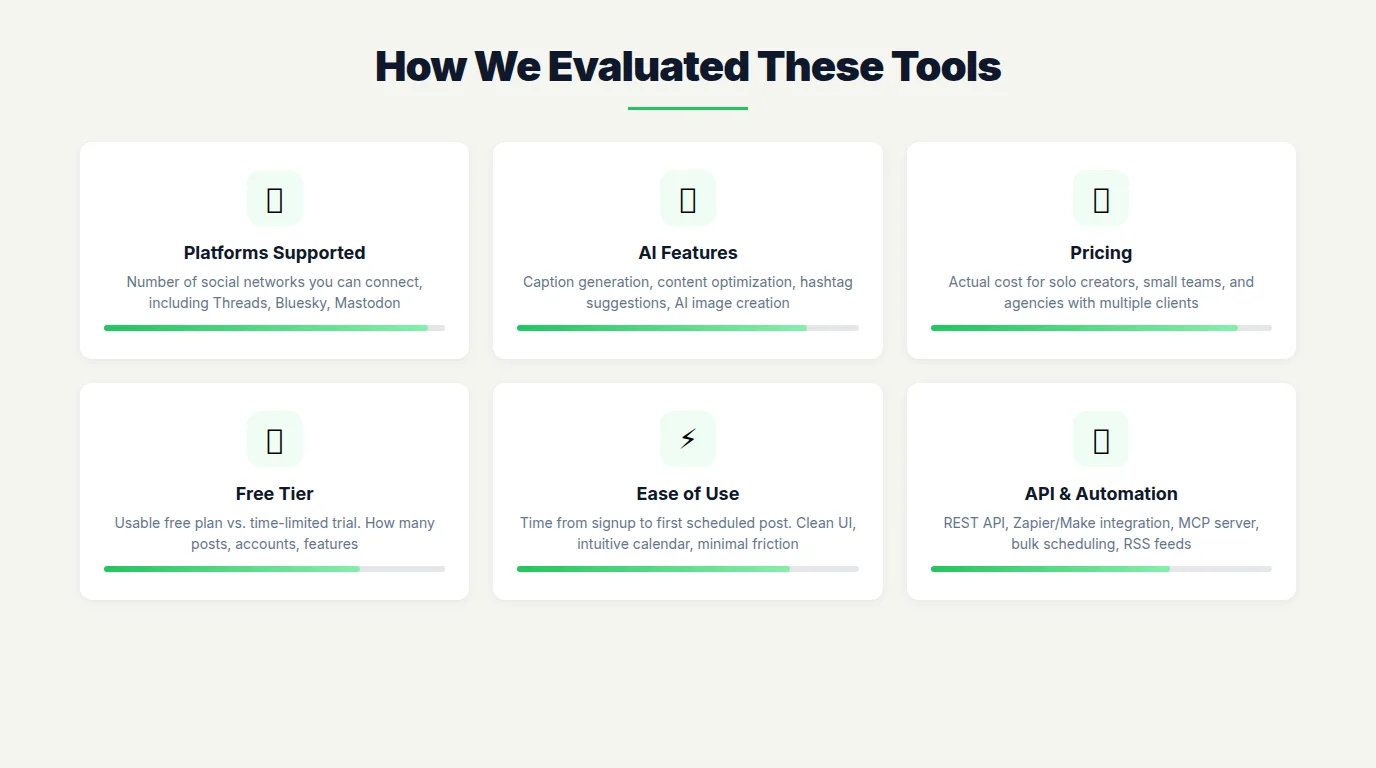
Every tool on this list was tested with real accounts. We evaluated based on six criteria:
- Platforms supported — How many social networks can you connect? Does it support Threads, Bluesky, and Mastodon?
- AI features — Can the tool generate captions, suggest hashtags, optimize posting times, or rewrite content per platform?
- Pricing — What does it actually cost for a solo creator, a small team, and an agency with 20+ clients?
- Free tier — Is there a usable free plan, or just a 14-day trial?
- Ease of use — How fast can a new user go from signup to first scheduled post?
- API & automation — Does it offer an API, Zapier integration, or MCP server for custom workflows?
Quick Comparison Table
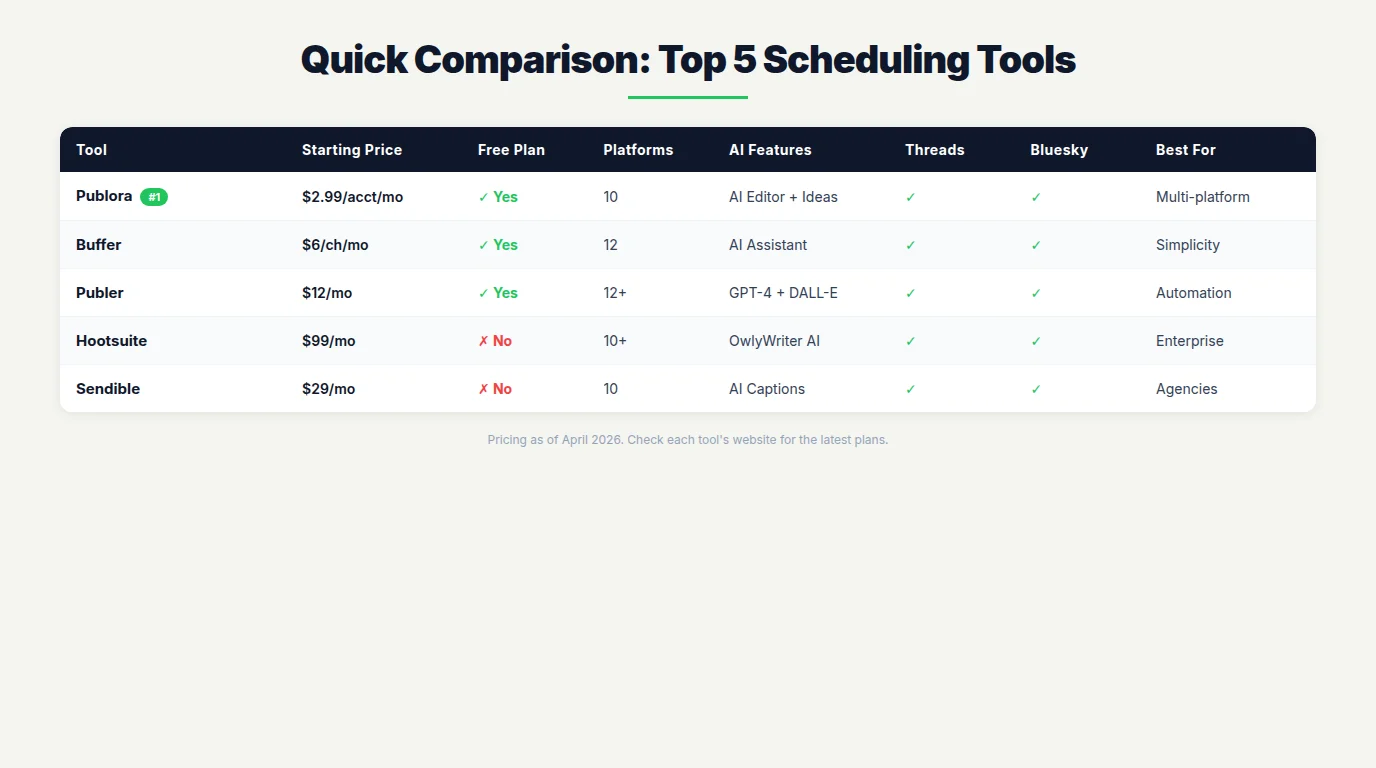
| Tool | Starting Price | Free Plan | Platforms | AI | Best For |
|---|---|---|---|---|---|
| Publora | $2.99/acct/mo | Yes (15 posts/mo) | 10 | AI Editor + Ideas | Multi-platform creators |
| Buffer | $6/channel/mo | Yes (3 channels) | 12 | AI Assistant | Simplicity |
| Hootsuite | $99/mo | No (30-day trial) | 10+ | OwlyWriter AI | Enterprise teams |
| Sprout Social | $199/seat/mo | No (30-day trial) | 10 | Trellis AI | Analytics & ROI |
| Later | $25/mo | Yes (limited) | 7 | AI Caption Writer | Visual-first brands |
| Publer | $12/mo | Yes (limited) | 12+ | GPT-4 + DALL-E 3 | Automation workflows |
| Planable | $33/user/mo | Yes (50 posts total) | 8 | AI Writing | Team collaboration |
| SocialBee | $29/mo | No (14-day trial) | 9 | AI Post Generator | Content recycling |
| Vista Social | $39/mo | Yes (limited) | 9 | AI Assistant | DM automation |
| Metricool | $22/mo | Yes (1 brand) | 9 | AI Social Assistant | Data-driven decisions |
| ContentStudio | $25/mo | No (14-day trial) | 10+ | AI Discovery + Writing | Content discovery |
| Sendible | $29/mo | No (14-day trial) | 10 | AI Caption Writer | Agencies |
The 12 Best Social Media Scheduling Tools
1. Publora — Best for Multi-Platform Creators
Pricing: Free plan available | Pro from $2.99/account/month | Premium $5.99/account/month
Publora is a newer entrant that has quickly carved a niche with broad platform coverage and aggressive pricing. It supports 10 platforms out of the box — including Bluesky, Mastodon, and Telegram — which puts it ahead of most competitors on emerging network support.
The per-account pricing model is different from the per-seat or flat-rate approach most tools use. If you manage 5 accounts, you pay for 5 accounts. This makes it extremely affordable for solopreneurs (one account = $2.99/month) and predictable for growing teams.
AI features are included on all plans, even the free tier. The AI Editor optimizes posts for each platform's format, while AI Post Ideas generates content suggestions based on your posting history.
A standout feature is the MCP (Model Context Protocol) server — making Publora one of the only scheduling tools you can control directly through AI agents like Claude Code. You can schedule posts, check analytics, and manage accounts entirely through natural language commands.
Pros: 10 platforms including Bluesky/Mastodon/Telegram, AI on all plans, cheapest per-account pricing, MCP/API integration, Instagram Reels/Stories/Carousels on all plans
Cons: Younger product with fewer reviews, analytics currently strongest on LinkedIn, X/Twitter locked to paid plans
Best for: Creators and small teams who post across many platforms and want AI features without enterprise pricing
2. Buffer — Best for Simplicity
Pricing: Free plan available | Essentials from $6/channel/month
Buffer has been the go-to scheduling tool for over a decade, and it remains the gold standard for clean, intuitive design. If you want a tool that "just works" without a learning curve, Buffer is it.
It supports 12 platforms — the most of any tool on this list — including early adoption of Bluesky (December 2024) and Mastodon. The free plan gives you 3 channels with 10 scheduled posts per channel, which is genuinely usable for personal brands.
Buffer's AI Assistant helps generate post ideas, repurpose content across platforms, and translate posts into different languages. The landing page builder (Start Page) is a nice bonus for creators who need a simple link-in-bio solution.
Pros: Easiest to use, 12 platforms, strong free plan, AI Assistant, landing page builder, Mastodon + Bluesky since early days
Cons: Limited analytics on lower tiers, no social listening, approval workflows only on Team plan
Best for: Solopreneurs and small teams who want simplicity over power features
3. Hootsuite — Best for Enterprise Teams
Pricing: Professional from $99/month (no free plan, 30-day trial)
Hootsuite is the 800-pound gorilla of social media management. It's not the cheapest or the simplest, but for enterprise teams that need social listening, comprehensive analytics, and granular permissions, it's hard to beat.
The platform supports Facebook, Instagram, X, LinkedIn, TikTok, YouTube, Pinterest, Threads, and Bluesky. OwlyWriter AI generates captions and suggests content ideas. The social listening suite — including Bluesky listening — is one of the most powerful on the market.
The $99/month starting price is steep, and the interface can feel overwhelming for new users. But for teams managing 10+ profiles with approval chains and compliance needs, Hootsuite delivers.
Pros: Best-in-class social listening, deep analytics, enterprise permissions, OwlyWriter AI, Bluesky + Threads support
Cons: Expensive ($99/mo minimum), steep learning curve, no free plan, Mastodon only via third-party plugin
Best for: Enterprise marketing teams with 10+ profiles and compliance requirements
4. Sprout Social — Best for Analytics & ROI
Pricing: Standard from $199/seat/month (no free plan, 30-day trial)
Sprout Social is the premium choice for teams that live and breathe social data. Its reporting capabilities are unmatched — custom report builders, competitive analysis, and cross-channel performance dashboards make it the tool of choice for proving social media ROI to executives.
The platform connects to X, Facebook, Instagram, LinkedIn, TikTok, Pinterest, YouTube, Threads, Bluesky, and WhatsApp. Trellis AI, their social intelligence partner, transforms listening data into actionable business strategy insights.
The catch? Price. At $199 per seat per month, Sprout Social is 3-4x more expensive than most alternatives. For teams that can justify the investment with data-driven ROI reports, it pays for itself. For everyone else, it's overkill.
Pros: Best analytics and reporting, Trellis AI, competitor analysis, CRM integration, enterprise-grade
Cons: Most expensive tool on this list ($199/seat), no Mastodon support, no free plan
Best for: Mid-to-large companies that need boardroom-ready social media reports
5. Later — Best for Visual-First Brands
Pricing: Free plan available | Starter from $25/month
Later started as an Instagram scheduling tool and still shines brightest for visual content. The drag-and-drop visual planner, media library, and Instagram grid preview make it the top choice for brands where aesthetics matter.
It supports Instagram, Facebook, TikTok, LinkedIn, X, Pinterest, and YouTube. The AI Caption Writer generates text for your visual content, and Linkin.bio turns your Instagram feed into a clickable landing page.
Later was acquired by Mavrck (now Later's influencer marketing platform), which has shifted its focus toward creator and influencer workflows. If you're purely looking for a scheduling tool without the influencer features, you may find better value elsewhere.
Pros: Best visual content planner, Instagram grid preview, Linkin.bio, media library, influencer tools
Cons: Fewer platform connections (7), no Bluesky/Mastodon, influencer features inflate pricing, limited analytics on lower tiers
Best for: Instagram-first brands, DTC companies, and visual content creators
6. Publer — Best for Automation Workflows
Pricing: Free plan available | Professional from $12/month
Publer is the automation powerhouse. With 10 platforms (including Threads, Bluesky, Mastodon, Telegram, and WordPress), RSS auto-posting, bulk scheduling, content recycling, and watermark features, it packs more automation per dollar than almost any competitor.
AI features include GPT-4 powered caption generation and DALL-E 3 image creation directly in the composer. The ability to schedule threaded posts across X, Threads, Mastodon, and Bluesky simultaneously is a standout feature few others match.
Publer's interface isn't as polished as Buffer or Later, and the learning curve for advanced automation is real. But for power users who want to set up complex workflows, it's a bargain.
Pros: 10 platforms including all decentralized networks, GPT-4 + DALL-E 3, bulk scheduling, RSS auto-posting, content recycling, affordable
Cons: UI less polished, learning curve for advanced features, analytics could be deeper
Best for: Power users and automation enthusiasts who want maximum platform coverage at a low price
7. Planable — Best for Team Collaboration
Pricing: Free plan (50 posts total) | Basic from $33/user/month
Planable was built for teams, and it shows. The real-time collaboration, multi-level approval workflows (none, optional, required, multi-level), and visual content calendar make it the closest thing to "Google Docs for social media."
It supports Facebook, Instagram, X, LinkedIn, TikTok, YouTube, Pinterest, and Google Business Profile. AI features include caption generation from images/videos, hashtag suggestions, and content ideation. The feed preview shows exactly how posts will look on each platform before publishing.
The free plan is unique: 50 total posts (not per month) with full feature access. Once you hit 50, you need to upgrade. Good for testing, not for long-term free use.
Pros: Best approval workflows, real-time collaboration, feed preview, AI writing, clean interface
Cons: No Bluesky/Mastodon, free plan is 50 posts total (not monthly), per-user pricing adds up
Best for: Marketing teams with multi-step approval processes and content review needs
8. SocialBee — Best for Content Recycling
Pricing: Bootstrap from $29/month (14-day trial, no free plan)
SocialBee's content categories and recycling system set it apart. You organize posts into categories (promotions, tips, curated content, etc.), set a posting schedule per category, and SocialBee automatically cycles through your content library. Evergreen content keeps posting without you touching it.
It supports Facebook, Instagram, X, LinkedIn, TikTok, Pinterest, YouTube, Google Business, and Bluesky. The AI Post Generator creates content from prompts, and Canva integration lets you design visuals without leaving the app.
Pros: Best content recycling, category-based scheduling, AI post generator, Canva integration, Bluesky support
Cons: No free plan, no Mastodon or Threads, interface can feel cluttered, no social listening
Best for: Businesses with evergreen content that needs to stay in rotation
9. Vista Social — Best for DM Automation
Pricing: Free plan available | Pro from $39/month
Vista Social quietly offers one of the most complete feature sets at its price point. Scheduling, social inbox (with DM automation), listening, reporting, and review management — all in one tool.
It supports Facebook, Instagram, X, LinkedIn, TikTok, YouTube, Pinterest, Google Business, and Threads. The AI assistant helps with caption generation and optimal timing. The DM automation feature lets you set up auto-replies and chatbot-style flows in Instagram and Facebook DMs.
Pros: DM automation, social inbox, full management suite, competitive pricing, review management
Cons: No Bluesky or Mastodon, less known brand, free plan is very limited
Best for: Businesses that need DM automation and a unified social inbox without enterprise pricing
10. Metricool — Best for Data-Driven Decisions
Pricing: Free plan (1 brand) | Starter from $22/month
Metricool is the analytics-first scheduling tool. While other tools treat analytics as an add-on, Metricool makes data the centerpiece. Real-time dashboards, competitor benchmarking, hashtag tracking, and ad analytics across Facebook, Instagram, and Google — all included even on lower tiers.
It supports Facebook, Instagram, X, LinkedIn, TikTok, YouTube, Pinterest, Threads, and Google Business. The free plan gives you 1 brand with 50 posts per month, which is genuinely useful for solo marketers.
Pros: Best analytics for the price, competitor benchmarking, ad analytics, hashtag tracking, usable free plan
Cons: No Bluesky or Mastodon, scheduling features less advanced than competitors, limited collaboration tools
Best for: Data-focused marketers who want analytics depth without Sprout Social pricing
11. ContentStudio — Best for Content Discovery
Pricing: Starter from $25/month (14-day trial, no free plan)
ContentStudio solves the "what do I post?" problem better than anyone. Its content discovery engine monitors thousands of sources to surface trending topics in your industry, with AI-powered relevance scoring. You can go from discovering a trending article to scheduling a curated post about it in under a minute.
It supports Facebook, Instagram, X, LinkedIn, TikTok, YouTube, Pinterest, Threads, Bluesky, and Google Business. AI writing tools help generate captions, and the multi-thread posting for Bluesky (up to 25 threads) is a nice touch.
Pros: Best content discovery, AI relevance scoring, trending topics, Bluesky multi-threading, strong curation tools
Cons: No free plan, no Mastodon, can be overwhelming for simple scheduling needs
Best for: Content marketers who rely on curation and trend-jacking as part of their strategy
12. Sendible — Best for Agencies
Pricing: Creator from $29/month (14-day trial, no free plan)
Sendible was purpose-built for agencies. White-label reporting, client dashboards, per-client workspaces, bulk importing, and Smart Queues (automated evergreen recycling) are all designed for managing multiple client accounts efficiently.
It supports Facebook, Instagram, X, LinkedIn, TikTok, YouTube, Google Business, Threads, Bluesky, Pinterest, and WordPress. AI caption generation and content library features help maintain consistency across client brands.
Pros: Built for agencies, white-label reporting, client dashboards, Smart Queues, Bluesky + Threads, WordPress publishing
Cons: No free plan, no Mastodon, interface feels dated, analytics less deep than Sprout Social
Best for: Social media agencies managing 5+ client accounts
Free Plan Comparison
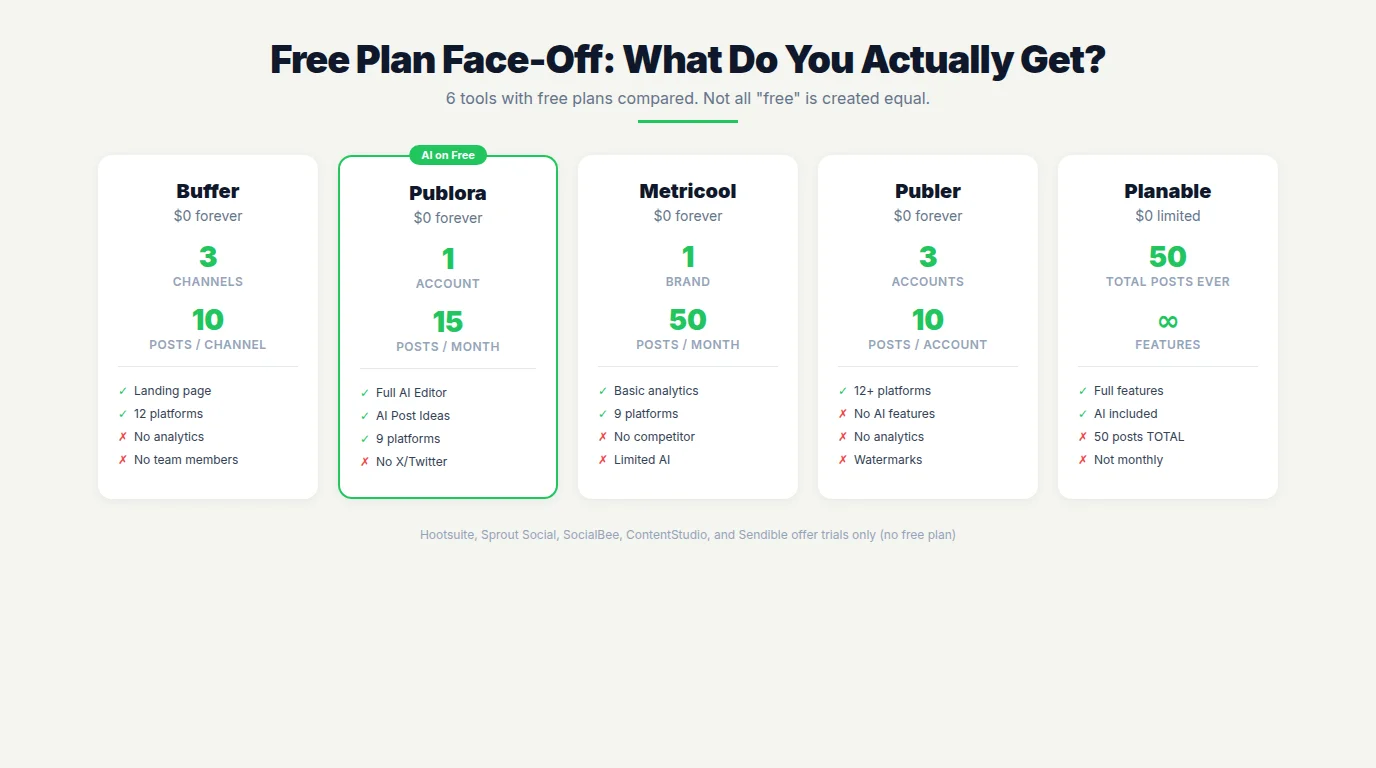
Not every tool offers a free plan. Here's what you get from those that do:
| Tool | Accounts | Post Limits | AI Included | Notable Limits |
|---|---|---|---|---|
| Buffer | 3 channels | 10/channel/mo | Limited | No analytics, no team members |
| Publora | 1 account | 15/mo total | Yes (full) | No X/Twitter, 50MB video limit |
| Publer | 3 accounts | Limited | No | No AI, no analytics, watermark on images |
| Metricool | 1 brand | 50/mo | Limited | Basic analytics, no competitor tracking |
| Planable | Full access | 50 total (ever) | Yes | 50 posts lifetime, not monthly |
| Later | 1 social set | 5/profile | No | Very limited, essentially a trial |
Verdict: Buffer wins on channel count (3 free channels). Publora wins on AI access (full AI on free plan). Metricool wins on post volume (50/month). Planable wins on feature access but has a hard lifetime cap.
Which Tools Support Threads, Bluesky, and Mastodon?
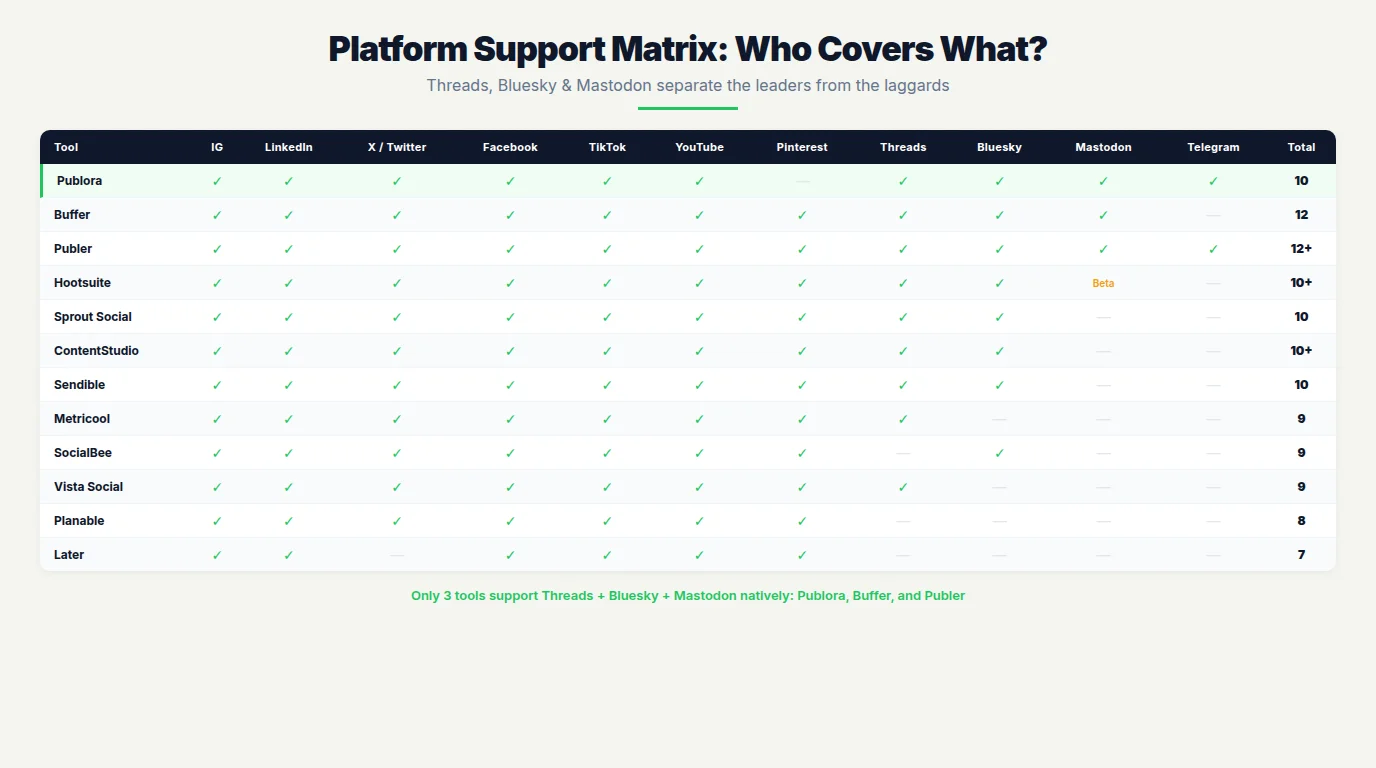
The rise of decentralized social networks has created a real gap in tool coverage. Here's the 2026 platform support matrix for the three newest networks:
| Tool | Threads | Bluesky | Mastodon |
|---|---|---|---|
| Publora | ✓ | ✓ | ✓ |
| Buffer | ✓ | ✓ | ✓ |
| Publer | ✓ | ✓ | ✓ |
| Hootsuite | ✓ | ✓ | Beta* |
| Sprout Social | ✓ | ✓ | ✗ |
| ContentStudio | ✓ | ✓ | ✗ |
| Sendible | ✓ | ✓ | ✗ |
| Metricool | ✓ | ✗ | ✗ |
| Planable | ✗ | ✗ | ✗ |
| SocialBee | ✗ | ✓ | ✗ |
| Vista Social | ✓ | ✗ | ✗ |
| Later | ✗ | ✗ | ✗ |
*Hootsuite Mastodon support requires the Fedica plugin, not built-in natively.
Key takeaway: Only three tools — Publora, Buffer, and Publer — support all three emerging platforms natively. If decentralized networks are part of your strategy, your options narrow quickly.
How to Choose the Right Tool
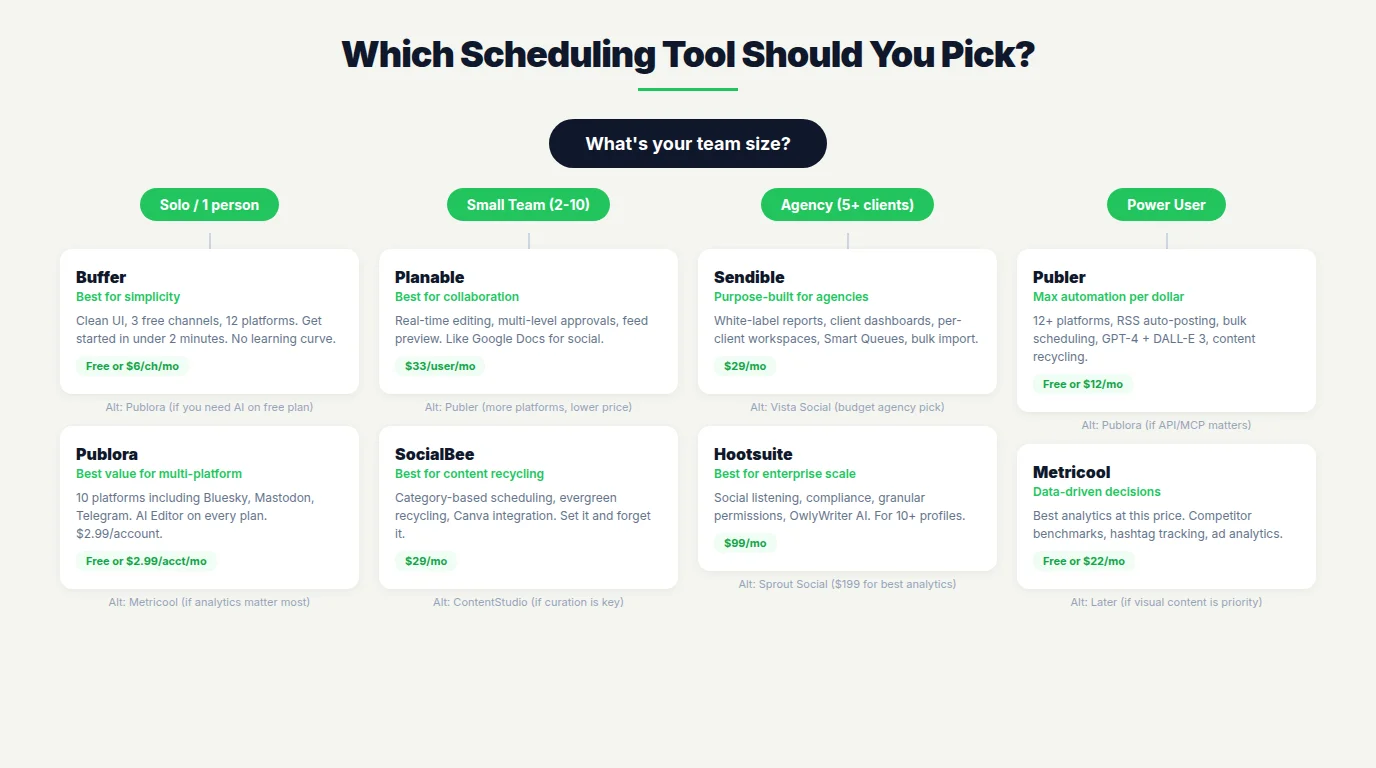
The "best" tool depends on your situation. Here's a quick decision framework:
Solopreneur / Personal Brand
Priority: Low cost, ease of use, broad platform support
- Budget pick: Buffer (free, 3 channels) or Publora (free, AI included)
- Best value: Publora Pro ($2.99/account) or Buffer Essentials ($6/channel)
Small Team (2-5 people)
Priority: Collaboration, approval workflows, shared calendar
- Best for approval workflows: Planable
- Best all-around: Buffer Team or Publer Business
- Best for data: Metricool
Agency (5+ clients)
Priority: Client management, white-label, scalability
- Purpose-built for agencies: Sendible
- Budget agency pick: Vista Social or Publora (per-client workspaces)
- Full suite: Hootsuite or Sprout Social
Enterprise (50+ employees)
Priority: Compliance, permissions, social listening, integrations
- Best overall: Hootsuite or Sprout Social
- Best for ROI reporting: Sprout Social
- Best for social listening: Hootsuite
Frequently Asked Questions
What is the best free social media scheduling tool in 2026?
Buffer offers the strongest free plan for beginners: 3 channels, 10 scheduled posts per channel, and a landing page builder. Publora's free plan includes AI features on all plans. Metricool gives the most posts (50/month) on its free tier.
Which scheduling tools support Threads and Bluesky?
Buffer, Hootsuite, Sprout Social, Publer, Publora, ContentStudio, and Sendible all support both Threads and Bluesky. For Mastodon, the options narrow to Buffer, Publer, and Publora.
How much do social media scheduling tools cost?
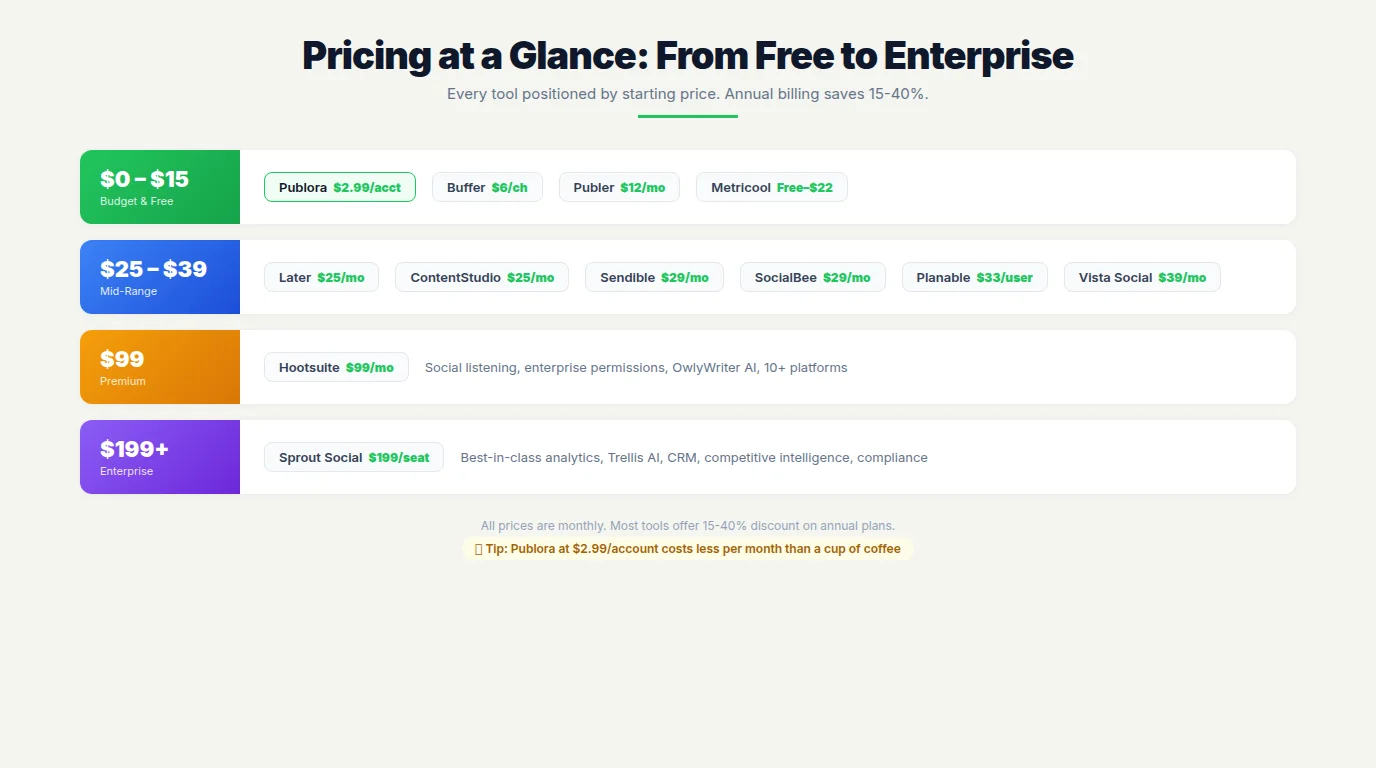
Budget: $3-15/month (Publora, Publer). Mid-range: $22-39/month (Buffer, SocialBee, Metricool, Later, ContentStudio, Sendible, Vista Social). Premium: $33-99/month (Planable, Hootsuite). Enterprise: $199+/month (Sprout Social).
Can I schedule posts to TikTok and Instagram Reels?
Yes. All 12 tools on this list support TikTok scheduling and Instagram Reel publishing in 2026. Instagram Stories and Carousel scheduling are also widely supported.
Do scheduling tools reduce engagement?
No. Social platforms treat scheduled posts identically to manual ones. Scheduling often improves engagement because it enables consistent posting at optimal times.
How many hours per week does scheduling save?
Research shows 6-10 hours per week for individual managers. Teams managing 5+ profiles often report saving 10-15 hours weekly by batching content creation.
What's the difference between a scheduler and a management tool?
A scheduler focuses on planning and auto-publishing (Buffer, Publer, Publora). A management tool adds social listening, inbox management, analytics, and CRM features (Hootsuite, Sprout Social). Most tools sit somewhere on the spectrum.
Which tool is best for agencies?
Sendible is purpose-built for agencies with white-label reporting and client dashboards. Planable excels at approval workflows. For budget-conscious agencies, Vista Social and Publora offer client workspace features at lower prices.
Final Verdict
There's no single "best" tool — the right choice depends on your needs, team size, and budget. But here are our top picks by category:
- Best value for multi-platform posting: Publora ($2.99/account, 10 platforms, AI included)
- Best for getting started (free): Buffer (3 channels, simplest UX)
- Best for automation power users: Publer (10 platforms, bulk scheduling, RSS)
- Best for team collaboration: Planable (approval workflows, real-time editing)
- Best for analytics: Sprout Social (if you can justify $199/seat) or Metricool (budget alternative)
- Best for agencies: Sendible (white-label, client workspaces)
- Best for enterprise: Hootsuite (social listening, compliance, scale)
The social media scheduling landscape is more competitive than ever. Tools that were overpriced a year ago now face real pressure from AI-native alternatives with broader platform support. That's good news for you — whether you're a solo creator or an enterprise team, there's a tool that fits your workflow and budget.
Ready to simplify your social media workflow?
Publora lets you schedule across 10 platforms with AI features included — even on the free plan. No credit card required.
Try Publora Free →Serge Bulaev
CEO & Founder at Publora
Serge Bulaev is the CEO and founder of Publora, a multi-platform social media management tool built for creators, teams, and agencies. He has spent over a decade building tools at the intersection of content and technology.
Disclosure: Publora is our product, and it's listed #1 in this roundup. We've been transparent about its strengths and limitations throughout. All other tools were evaluated independently based on publicly available information, hands-on testing, and current pricing as of April 2026. We have no affiliate relationships with any tool on this list.
Sources & References
- Social media management market data: Markets and Markets, Cognitive Market Research (2026)
- Buffer platform support: buffer.com
- Hootsuite features: hootsuite.com
- Sprout Social platforms: sproutsocial.com
- Publer platform support: publer.com
- Sendible supported platforms: sendible.com
- ContentStudio Bluesky: contentstudio.io
- Scheduling tool comparison: Zapier (2026)
Related Articles
Build a Content Bot: RSS to AI Caption to Auto-Publish
Build a content bot that reads an RSS feed, writes a caption with AI, and auto-publishes to social media through the Publora API. Full flow, real endpoints.
Social Media API: Rate Limits, Tokens, and Webhooks Explained
A developer reference for the Publora social media API - how API-key auth works, what rate limits actually apply, and how to set up webhooks for post events.
How to Automate Social Media Posts with Python and the Publora API
A working Python guide to automating social media: connect accounts, post to 10 platforms, schedule with one script, and attach media - using the Publora API.
Headless Social Media Publishing: What It Is and Why It Matters
Headless social media publishing means posting through an API instead of a dashboard. Here's what it unlocks, when it's worth it, and how to start with Publora.