How to Connect Publora to Manus AI Agent in 30 Seconds
TL;DR
Connect Publora to Manus AI agent with one natural-language prompt and start posting to 10 social platforms autonomously. Setup guide with 9 skills, real conversation examples, and troubleshooting.
TL;DR
Tell Manus to install skills from github.com/publora/skills, paste your Publora API key when asked, and the agent gains 9 social media skills covering 10 platforms. Setup takes about 30 seconds. Then you stop opening dashboards — you tell Manus what to research, draft, and post, and it does the work autonomously.
What Is Manus — and Why Connect It to Publora?
Manus is an autonomous AI agent that takes real actions in the world. It searches the web, reads files, writes code, browses pages, and runs multi-step workflows on its own. The shift from earlier AI tools is simple: Manus does not just suggest what to do — it does it.
Publora is a social media management platform that connects to 10 platforms (LinkedIn, Threads, Telegram, Instagram, TikTok, Bluesky, X, YouTube, Facebook, Mastodon) through a single API and a single dashboard. When you install the Publora skills package in Manus, the agent gains the ability to draft, schedule, cross-post, and pull analytics — all through natural language instructions.
The result: you stop being the bottleneck. Manus posts when you tell it to, not when you have time to log in.
What you'll learn in this guide:
- How to install Publora skills in Manus with one natural-language prompt
- The 9 skills available and what each one does
- Real conversation examples — research-and-post, cross-platform, analytics
- When to use MCP vs the REST API for autonomous Manus workflows
- Troubleshooting common installation and connection issues
30s
Setup time — one natural-language prompt is enough
9
Skills available — posting, scheduling, analytics
10
Platforms — LinkedIn, Instagram, X, Telegram, and more
Prerequisites
Before you start, make sure you have:
- Manus access — sign up at manus.im if you do not have an account yet. Manus runs in the browser and does not require local installation.
- A Publora account — create one for free at publora.com/register. The free Starter plan covers 15 posts per month on all platforms except X/Twitter.
- At least one connected social media account — connect your LinkedIn, Instagram, X, Telegram, or other platforms in the Publora dashboard under Connections.
Already using Claude Code, Cursor, or OpenClaw?
The Publora skills package is agent-agnostic. It works with any agent that supports the MCP protocol or HTTP REST APIs — including Claude Code, Cursor, OpenClaw, Windsurf, and Manus. The setup steps in this guide are Manus-specific, but the underlying integration is the same.
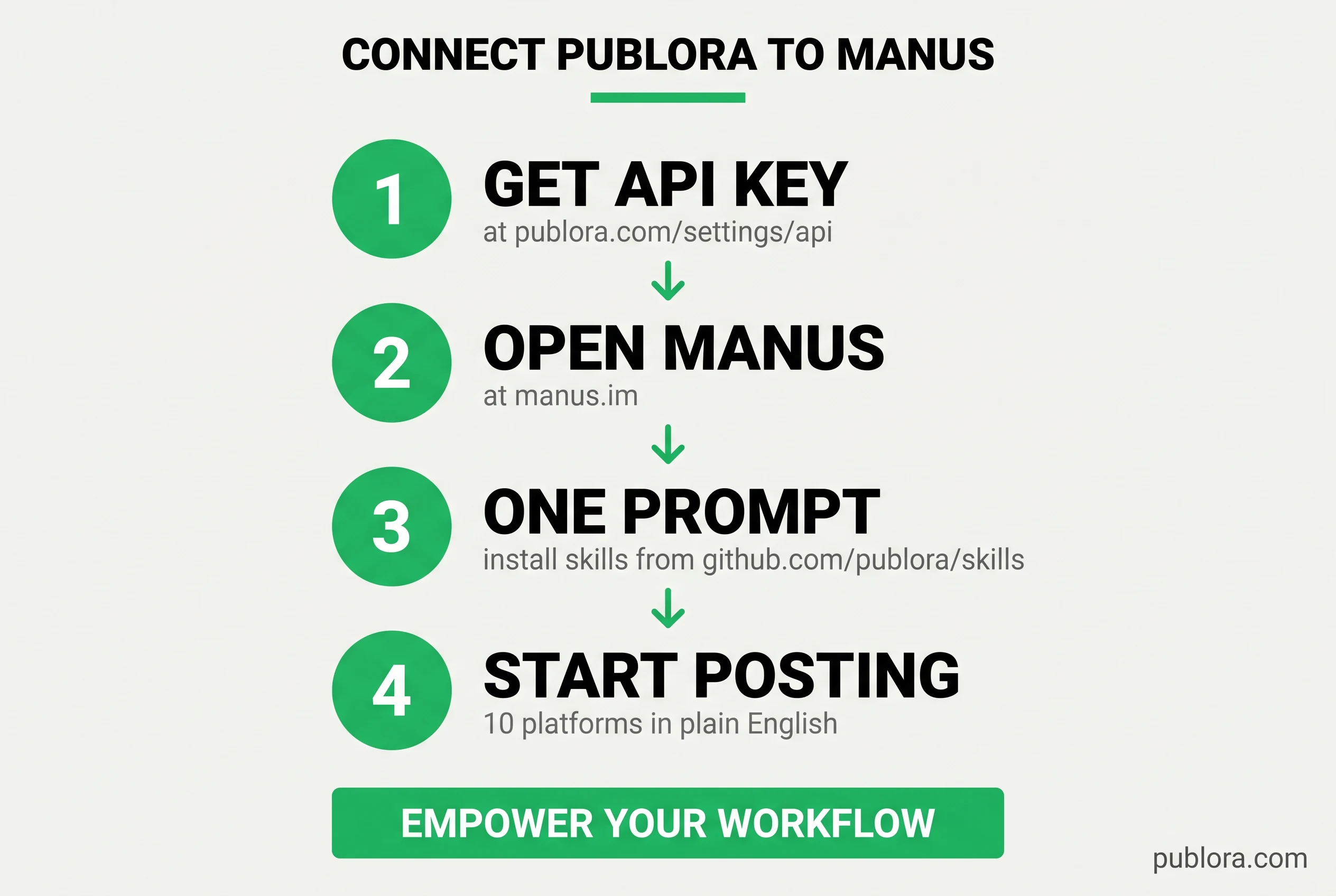
Step 1: Get Your Publora API Key
The API key authenticates Manus against your Publora workspace. Without it, Manus can install the skills but cannot make any actual posts.
- Log in to publora.com
- Go to Settings -> API
- Click "Create API Key"
- Copy the key — it starts with
sk_
Save your API key securely
Your API key is shown only once when you create it. Copy it immediately. If you lose it, you will need to create a new one. Never share it publicly or commit it to a Git repository — anyone with the key can post to your connected social accounts.
Step 2: Tell Manus to Install the Skills
This is where Manus is different from a CLI tool like Claude Code or a browser extension. You do not run a setup command yourself. You just tell Manus what to do, in plain English, and it handles the rest.
Open a Manus session and paste this single prompt:
Install skills from https://github.com/publora/skillsManus will:
- Fetch the package from GitHub
- Parse the available skills (9 of them)
- Ask you for your Publora API key (paste the
sk_...key from Step 1) - Verify the key against the Publora API
- Confirm the integration is live and list which platforms are connected
What just happened?
Manus loaded the Publora skills package as a tool group. Each skill maps to one of the Publora REST API endpoints (or MCP tools, depending on the workflow). When you give Manus a task that involves social media, it now picks the right skill, fills in the parameters from your instructions, and calls the API on your behalf — no Manus dashboard, no copy-paste, no manual API calls.
Step 3: Verify the Connection
Before you trust Manus with real posts, make sure the integration is live. Ask it to list your connected platforms:
You: What social media accounts do I have connected in Publora?
Manus: Checking your connected accounts via the Publora skills package.
Calling skill: list_connections
You have 3 connected accounts:
1. LinkedIn — Serge Bulaev
2. Threads — @samuinews
3. Telegram — PubloraBot
All three connections are active and ready for posting.
If you see your accounts listed, the integration is working. If Manus says it cannot find the Publora skills, see the troubleshooting section below.
All 9 Publora Skills Available to Manus
Once the skills package is installed, Manus has access to 9 skills — 8 for posting and 1 for analytics. Each skill is a tool Manus can call autonomously when your instruction implies it.
Posting Skills (8)
linkedin-post
Create and schedule LinkedIn posts. Supports text, images, videos, documents, and articles.
threads-post
Post to Meta's Threads with auto-threading for long content and image carousels.
telegram-post
Post to Telegram channels with full markdown formatting and media support.
instagram-post
Post photos, carousels, Reels, and Stories. Requires an Instagram Business account.
tiktok-post
Upload videos to TikTok with privacy and interaction controls.
bluesky-post
Post to Bluesky with rich text facets, images, videos, and alt text.
x-post
Post to X (Twitter) with auto-threading, image and video support. Pro plan only.
social-post
Unified skill for YouTube, Facebook Pages, and Mastodon — video uploads and fediverse posting.
Analytics Skills (1)
linkedin-analytics
Pull engagement metrics, follower growth, reactions, and comments from your LinkedIn account. Useful for weekly summaries and post-mortems.
Real Examples: Manus + Publora in Action
Here is what it actually looks like to manage social media with Manus once Publora is connected. These are workflows you can run today.
Research and Schedule from a Single Prompt
You: Research what people are saying about MCP this week and post a summary to LinkedIn and Threads tomorrow at 9am EST.
Manus: On it. I will pull recent MCP discussions from LinkedIn, Hacker News, and X, then draft and schedule the post.
Searching the web for "MCP Model Context Protocol" (last 7 days)...
Calling skill: linkedin-post
Calling skill: threads-post
Done — both posts are scheduled for tomorrow at 9:00 AM EST (14:00 UTC).
LinkedIn: 142-word summary with 3 specific examples (Anthropic, Cursor, Block)
Threads: 4-post thread (auto-threaded from the same source)
Status: scheduled
Cross-Post and Follow Up
You: Also schedule it on X. And add the same content to Telegram now.
Manus:
Calling skill: x-post
Calling skill: telegram-post
X: scheduled for 9:00 AM EST tomorrow (auto-trimmed to 280 chars, threaded for the rest)
Telegram: posted now to PubloraBot — full markdown formatting kept
Cross-platform reach is now LinkedIn + Threads + X + Telegram. Want me to also pull engagement stats tomorrow afternoon?
Pull Weekly Analytics
You: How did my LinkedIn posts perform this week?
Manus:
Calling skill: linkedin-analytics
Pulling engagement data for the last 7 days.
Posts published: 4
Total impressions: 12,847
Total engagement: 342 (2.7% rate)
Top post: "We just shipped our new API documentation..." — 4,231 impressions, 89 reactions
Follower growth: +28 this week
Your API docs post outperformed your weekly average by 3x. Content about developer tools and documentation resonates well with your audience. Want me to draft 2 more posts in that direction for next week?
Generate Carousel from a Folder
You: Take the 5 images from /campaign-q2/ and post them as an Instagram carousel tomorrow at 11am with a caption introducing the launch.
Manus:
Reading /campaign-q2/ (5 JPEG files, 1.8 to 2.4 MB each)
Calling skill: instagram-post
Carousel scheduled. 5 slides (slide-1.jpg through slide-5.jpg), scheduled for tomorrow at 11:00 AM, caption draft attached. Reply with edits or "ship it" and I will lock it in.
MCP vs REST API: Which Should Manus Use?
The Publora skills package supports both transports. The right choice depends on how you are using Manus.
REST API (recommended for Manus)
Best for autonomous workflows.
- Simpler HTTP requests, no session state
- Easier to debug and log
- Works the same in foreground or background
- Recommended for scheduled Manus jobs
MCP Server
Best for interactive sessions.
- Tool discovery happens automatically
- Conversational tool calls
- Same protocol as Claude Code, Cursor, Windsurf
- Useful when Manus is paired with other MCP tools
The skills package handles the routing automatically. You do not have to choose explicitly — when Manus runs a fast interactive command, it uses the closest available transport. When Manus runs an autonomous workflow that may take hours, it falls back to the REST API.
Troubleshooting Common Issues
"Manus cannot find the Publora skills"
| Cause | Fix |
|---|---|
| GitHub URL typo | Use exactly github.com/publora/skills — no trailing slash, no tree/main |
| Manus session timed out | Restart the session and re-run the install prompt |
| Manus has skill installation disabled | Enable the skills feature in Manus settings, then retry |
"Authorization failed" or "Invalid API key"
The API key did not validate. Check three things:
- The key starts with
sk_and you copied it without leading or trailing whitespace - The key was not revoked in publora.com/settings/api
- You pasted the key in the prompt where Manus asked for it, not in the install command
If the key looks right but still fails, create a new key and re-run the install prompt with the fresh value.
"No connected platforms found"
The skills package is installed and the API key works, but you have not connected any social accounts yet. Open publora.com, go to Connections, and add at least one platform (LinkedIn, Threads, Telegram, Instagram Business, etc.) via OAuth. Then ask Manus to list connections again — it will pick up the new accounts immediately.
"My post is scheduled but never publishes"
Two common causes:
- Scheduled time is in the past. Manus uses the time you said in the prompt; if you say "tomorrow at 9am" but the AI converts to UTC and the result is already past, the post will fail to schedule. Always specify a time zone explicitly when in doubt.
- Free plan limit reached. The free Starter plan covers 15 posts per month. If you exceed it, new posts will not publish until the next billing cycle. Check your plan limits.
Quick diagnostic checklist
- Manus session is active and skills feature is enabled
- API key starts with
sk_and was not revoked - At least one social account is connected in publora.com -> Connections
- You are within your plan's monthly post limit
- Scheduled time is in the future and the right time zone
Beyond the Basics: Power User Workflows
Once Manus has the Publora skills, the real value comes from combining them with the rest of what Manus can do — file reads, web research, browser automation, code execution.
Generate Posts from a Spreadsheet
You: Read content-plan.csv and schedule all 5 posts to LinkedIn, one per day starting Monday at 9am.
Manus: Reading content-plan.csv (5 rows). Drafting LinkedIn versions and scheduling them now.
Calling skill: linkedin-post (5 times)
All 5 posts scheduled. Mon 9:00, Tue 9:00, Wed 9:00, Thu 9:00, Fri 9:00 — all in EST.
Auto-Repurpose a Blog Post
You: Read my latest blog post at example.com/blog/post and create one LinkedIn post, one Threads thread, and one X thread with platform-appropriate length and tone. Schedule them across the next 3 days.
Manus:
Fetching example.com/blog/post...
Calling skill: linkedin-post, threads-post, x-post
Three repurposed versions scheduled. The LinkedIn post focuses on the takeaway, the Threads thread on the story behind it, and the X thread is the punchiest 280-char version. Want to see the drafts before they go live?
Weekly Recap Automation
Set up a recurring Manus task: every Friday afternoon, pull linkedin-analytics, identify the top-performing post, draft a "what worked this week" recap, and schedule it for Sunday evening. Manus does this autonomously and only pings you if something looks wrong.
Frequently Asked Questions
What is Manus and how does it work with Publora?
Manus is an autonomous AI agent that can take real actions — search the web, read files, write code, and now post to social media. When you install the Publora skills package, Manus gains 9 social media skills covering 10 platforms (LinkedIn, Threads, Telegram, Instagram, TikTok, Bluesky, X, YouTube, Facebook, Mastodon). You give Manus natural-language instructions and it handles research, drafting, scheduling, and publishing autonomously.
How do I install Publora skills in Manus?
One natural-language prompt: tell Manus "Install skills from github.com/publora/skills". Manus pulls the package automatically, asks for your Publora API key during setup (grab it from publora.com/settings/api), and the integration is live. Total time: about 30 seconds.
Is the Publora integration with Manus free?
Publora offers a free Starter plan with 15 posts per month across all platforms except X/Twitter. The Pro plan ($2.99/account/month) covers 100 posts and includes X/Twitter access. Manus has its own pricing through manus.im. The Publora skills package itself is free and open source on GitHub.
Which social media platforms can Manus post to via Publora?
10 platforms: LinkedIn, Threads, Telegram, Instagram (Business accounts), TikTok, Bluesky, X (Twitter, Pro plan only), YouTube, Facebook Pages, and Mastodon. Manus can post to one platform or all of them simultaneously from a single command — it auto-detects available connections and applies platform-specific formatting.
Does Manus use the Publora MCP server or REST API?
The Publora skills package supports both. For interactive sessions where Manus is following your conversation, the MCP server at mcp.publora.com is used. For autonomous workflows where Manus runs in the background, the REST API at api.publora.com is the better choice — simpler HTTP requests, no session state, easier to debug. The skills package handles the routing automatically based on context.
Can Manus also pull analytics from LinkedIn?
Yes. The linkedin-analytics skill gives Manus access to engagement metrics, follower growth, reactions, and comments on your LinkedIn posts. You can ask "how did my LinkedIn posts perform this week?" and Manus pulls the numbers, summarizes the top-performing content, and suggests what to post next.
Is it safe to let an AI agent post to my social accounts?
Yes. Publora uses official social media APIs (LinkedIn API, Meta Graph API, X API, etc.) with OAuth-based authentication — no scraping, no fake browsers, no terms-of-service grey area. You stay in control: Manus drafts, you can review before publishing, or set rules for auto-publishing specific content types. Your API key can be revoked at any time from publora.com/settings/api.
Ready to give Manus the keys to your social media?
Connect Publora to Manus in 30 seconds and stop being the bottleneck on your own content.
Get Started FreeFurther Reading
- Publora Skills Repository — open source skills package on GitHub
- MCP Client Setup Guide — full setup for Claude Code, Cursor, Windsurf, and more
- Authentication and API Keys — security and key management
- Create Post API Reference — complete endpoint documentation
- Scheduling Guide — time zone handling and best practices
- Manus AI — the autonomous agent home page
Related Articles
Build a Content Bot: RSS to AI Caption to Auto-Publish
Build a content bot that reads an RSS feed, writes a caption with AI, and auto-publishes to social media through the Publora API. Full flow, real endpoints.
Social Media API: Rate Limits, Tokens, and Webhooks Explained
A developer reference for the Publora social media API - how API-key auth works, what rate limits actually apply, and how to set up webhooks for post events.
How to Automate Social Media Posts with Python and the Publora API
A working Python guide to automating social media: connect accounts, post to 10 platforms, schedule with one script, and attach media - using the Publora API.
Headless Social Media Publishing: What It Is and Why It Matters
Headless social media publishing means posting through an API instead of a dashboard. Here's what it unlocks, when it's worth it, and how to start with Publora.