Best AI Agent for Social Media Automation in 2026
TL;DR
Manus, Claude Code, Cursor, Cline, Goose — which AI agent should run your social media in 2026? Honest comparison by use case, plus the Publora layer.
Best AI Agent for Social Media Automation in 2026
TL;DR
There is no single "best" AI agent for social media — there is the one that fits your workflow. Manus is strongest for autonomous research-and-post loops. Claude Code wins for terminal-first creators and developers. Claude Desktop is the simplest no-code entry. Cursor fits writing-and-publishing inside an IDE. Cline, Goose, and OpenClaw are open-source. All nine connect to the same 10 social platforms through Publora — either the open-source skills package or the MCP server at mcp.publora.com. The agent is the interface; Publora is the publishing layer.
What Makes an AI Agent Good for Social Media
Most "best AI tool for social media" lists in 2026 are still about content drafting tools — write a tweet faster, generate captions for Instagram. That's helpful, but it's not what an agent does. An agent takes actions: searches, reads, writes, calls APIs. The right agent for social media isn't the one with the slickest draft tool. It's the one that closes the loop — from "I should post about X" to "the post is scheduled."
Three things make an agent actually good at this job in 2026:
- Tool-calling reliability. The agent has to call a publishing API and not fabricate the result. Modern agents that support MCP or structured skill packages do this well; older "AI assistants" that only generate text do not.
- Multi-step orchestration. A real workflow is "research → draft → schedule → confirm." The agent has to chain those steps without losing context. Single-prompt completions are not enough.
- An ecosystem of skills, not a closed app. Social media platforms keep changing. Authentication, rate limits, format rules — every quarter something shifts. An agent that depends on its own narrow tool set will fall behind. An agent that uses an open skill package or open MCP standard inherits updates automatically.
The agents below all clear those three bars. The differences come down to where you'll be sitting when you use them.
Choose by Use Case, Not by Hype
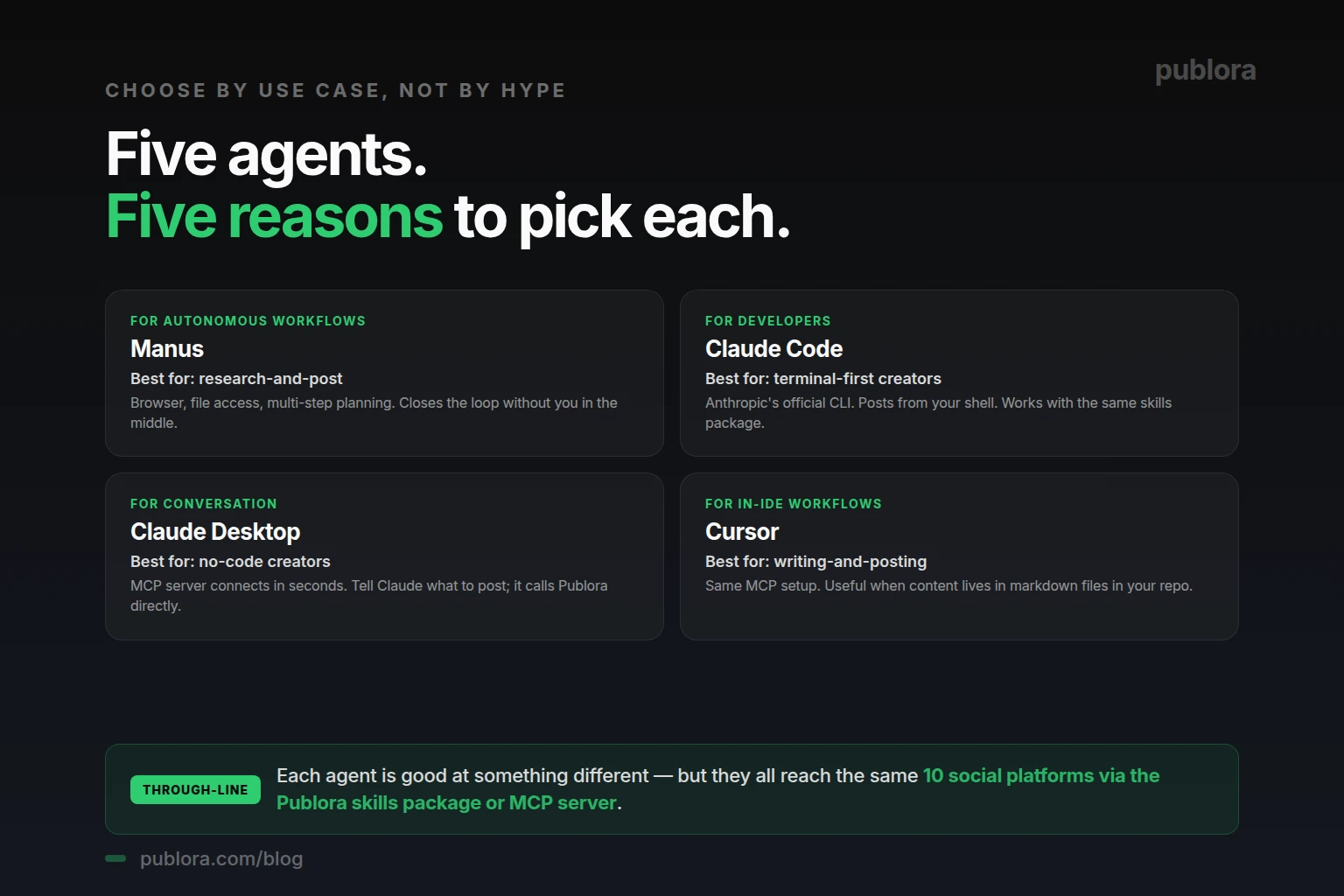
Manus — Best for Autonomous Workflows
Manus is the agent we'd recommend first to a creator who wants the most automation and the least supervision. It runs full autonomous loops — search the web, read sources, draft a post, schedule it on Publora — without you switching tools. The "research-and-post" workflow runs in 3–8 minutes per topic.
Best for: solo creators, founders, anyone who wants the agent to close the loop with minimal hand-holding. Setup: one natural-language prompt — "install skills from github.com/publora/skills" — and Manus pulls the package, asks for the API key, and the integration is live. We have a full guide in how to connect Publora to Manus in 30 seconds.
Claude Code — Best for Developers and Terminal Users
Claude Code is Anthropic's official command-line interface to Claude. It runs in your terminal, reads files, executes commands, and connects to MCP servers. For developers who already live in a shell and store content in markdown files inside a Git repo, Claude Code is the most natural fit.
Best for: developer-creators, technical founders, anyone whose content lives in a repo. Setup: add Publora's MCP server to ~/.claude/claude_desktop_config.json with your API key. Detailed guide: connect Publora MCP to Claude Code in 60 seconds.
Claude Desktop — Best for No-Code Conversation
Claude Desktop is Anthropic's desktop app — a chat interface that supports MCP servers. No CLI, no Git, no shell. You add Publora to the config file (or use the GUI, depending on your version), open Claude Desktop, and tell it what to post.
Best for: non-technical creators, marketers, anyone who prefers a chat UI over a terminal. Setup: the same MCP config block as Claude Code — mcp.publora.com with your API key. The interface is the only difference.
Cursor — Best for In-IDE Writing
Cursor is an AI-first code editor (based on VS Code) that supports MCP. If your workflow is "write content in markdown files, version it in Git, post when done," Cursor lets you do all three from one window. The same Publora MCP integration works as in Claude Code.
Best for: creators who write content in their IDE and want to keep one tool open. Setup: Cursor's MCP config — same URL, same API key.
Open-Source Alternatives — Cline, Goose, OpenClaw
For creators who prefer open-source tools or want full control over the agent, three options stand out. Cline is a VS Code extension; Goose is Block's open agent runtime; OpenClaw is a community-built MCP-compatible agent. All three support the Publora skills package or the MCP server. They require slightly more setup than the commercial options but cost nothing and are inspectable end-to-end.
Best for: developers who want open-source from end to end, teams with strict procurement policies, or anyone who wants to fork and customize.
Honorable Mentions: Codex, Devin
OpenAI's Codex CLI and Cognition's Devin are also listed on Publora's homepage. Both are heavier-weight agents oriented toward code generation, but they can run social media workflows the same way Claude Code can — through the MCP standard or by calling Publora's REST API directly. If you already use Codex or Devin for engineering work, adding Publora is a one-config-edit step.
No-Code Alternatives: n8n, Make, Zapier
Not every "agent" is a chat agent. For recurring or trigger-driven workflows — "every Monday at 8 AM, post the latest blog summary" — a no-code automation platform is often a better fit than a chat agent.
- n8n — open-source workflow automation. The Publora HTTP node accepts the same REST API payload, and n8n can chain it with web search nodes, LLM nodes, RSS readers, etc.
- Make — visual automation builder. Same pattern as n8n: HTTP node, API key in headers, multi-platform posts in one request.
- Zapier — Publora is callable through Zapier's webhook or HTTP step. Useful for "when X happens, post to Y" triggers.
The boundary between "agent" and "no-code automation" is increasingly blurry. The honest distinction: agents are conversational and adaptive; automations are repeatable and predictable. Most creators end up using both — agents for one-off creative tasks, automations for recurring distribution.
The Publora Layer: Why It Matters
Here's the part most "best AI agent" lists miss. The agent is the interface. The hard part isn't the chat UI or the autonomy — it's the integration with social media platforms.
Posting to LinkedIn, Instagram, X, TikTok, and Telegram requires nine different APIs, nine OAuth flows, nine sets of rate limits, nine sets of media format rules. Building those into your agent yourself is a multi-month engineering project that breaks every time a platform changes its API. Publora abstracts all of it behind one API key and one set of skills. The agent calls Publora; Publora calls the platforms.
This is why the same agent can work with Manus today and Cursor tomorrow without changing your social setup. The skills, the MCP tools, and the REST endpoints are agent-agnostic. Pick the agent that fits your workflow; keep the publishing layer constant.
A Decision Matrix
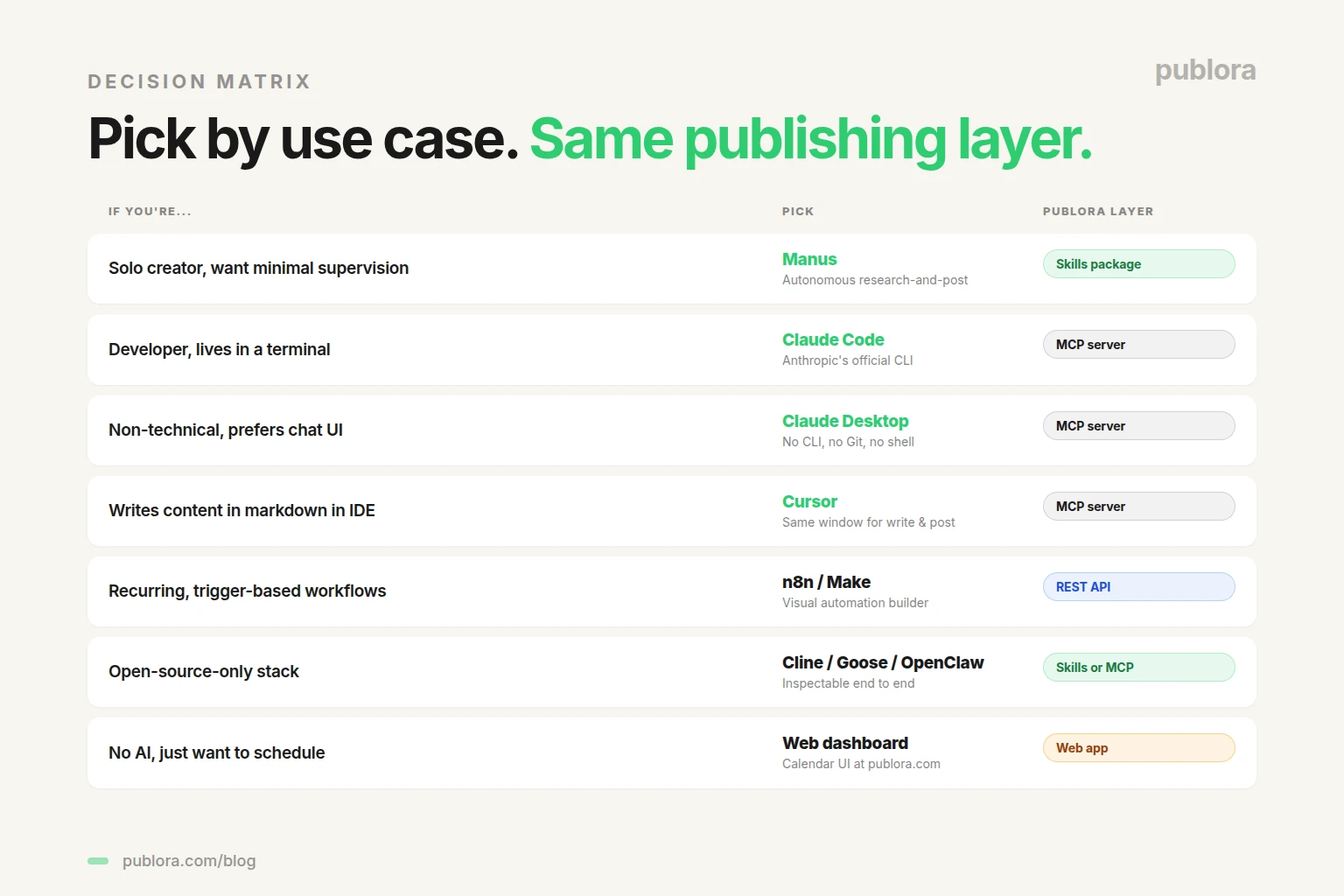
If you're stuck deciding, here's a fast read:
- Solo creator, want minimal supervision → Manus + Publora skills package
- Developer, lives in terminal → Claude Code + Publora MCP server
- Non-technical, prefers chat UI → Claude Desktop + Publora MCP server
- Writes content in markdown in an IDE → Cursor + Publora MCP server
- Recurring, trigger-based workflows → n8n or Make + Publora REST API
- Open-source-only stack → Cline / Goose / OpenClaw + Publora skills or MCP
- No AI at all, just want to schedule manually → Publora web dashboard
You can mix any combination. The Publora API key works across all of them.
What to Watch For in 2026
The AI agent space is moving fast. A few patterns to track over the next year:
- MCP becoming the standard. Anthropic's Model Context Protocol is the closest thing the industry has to a "USB-C for AI tools." More agents support it every quarter. The agents that don't will increasingly be edge cases.
- Skills packages over custom plugins. The shift from "agent-specific plugins" to "open skill packages" mirrors the shift in mobile from native-only apps to web standards. Publora's open-source skills repo is part of that shift.
- Recurring autonomy. Most agents today still require manual triggering. The next 12 months will see more agents capable of recurring schedules — "every Friday, run the research-and-post loop." This is where Manus and similar autonomous agents pull ahead.
- Multi-agent orchestration. One agent for research, another for drafting, a third for posting — coordinated by a router. Some early implementations exist (LangChain, AutoGen, CrewAI). The publishing endpoint stays the same: an agent of any kind calls Publora.
Frequently Asked Questions
What is the best AI agent for social media automation in 2026?
It depends on workflow. Manus for autonomous research-and-post loops. Claude Code for developers in a terminal. Claude Desktop for non-technical creators in a chat UI. Cursor for in-IDE writing. Cline, Goose, and OpenClaw for open-source. All connect to social media through Publora.
Which AI agents officially support Publora?
Publora's homepage lists Manus, Claude Code, Claude Desktop, Codex, Cursor, Cline, Goose, Devin, and OpenClaw — plus n8n, Make, and Zapier for no-code workflows. Any MCP-compatible agent or skill-package-compatible agent works.
Manus vs Claude Code: which is better for social media?
Different jobs. Manus is autonomous — best for research-and-post and batch workflows. Claude Code is terminal-first — best for developers and content stored as markdown in a repo.
Do I need an AI agent at all to use Publora?
No. Publora has a web dashboard at publora.com for manual scheduling, plus a REST API for direct HTTPS calls from n8n, Make, Zapier, or your own code. The AI agent path is the most automated; it's not required.
Which AI agent is free?
OpenClaw, Cline, and Goose are open-source. Manus, Claude Code, Claude Desktop, and Cursor have free tiers with usage limits. Publora's Starter plan is free for 9 of 10 platforms; X requires Pro at $2.99/account/month.
Can I use multiple AI agents with the same Publora account?
Yes. Your Publora API key works across every agent that supports the skills package or the MCP server. Different agents for different workflows is a common setup.
What's the easiest AI agent to set up for social media?
Claude Desktop and Manus are usually the fastest. Claude Desktop is one JSON config edit; Manus is one natural-language prompt to install the skills package.
Is the Publora skills package open source?
Yes. github.com/publora/skills under MIT license. Agent-agnostic — works with any agent that supports skill packages or MCP.
Pick your agent. Keep the publishing layer.
Free Starter plan, 10 social platforms, every supported AI agent works on the same API key.
Get Started FreeFurther Reading
Related Articles
Instagram Algorithm 2026: How Reach Really Works Now
How the Instagram algorithm works in 2026 - the separate systems for Feed, Reels, Stories, and Explore, why sends beat likes, and what Instagram says not to do.
LinkedIn Algorithm 2026: How It Ranks Posts (and Why AI Search Cites Them)
How the LinkedIn algorithm works in 2026 - the AI ranking model, the signals that matter, what gets suppressed, and why your posts now show up in AI search.
LinkedIn Collaborative Posts: A Shared Byline Is Now a Feature
LinkedIn Collaborative Posts let two or more people and Pages co-publish one post to both audiences. Here's what they are, who they're for, and how to use them.
Publer vs Publora: Which Is Actually Cheaper Per Account? (2026)
Publer vs Publora on real 2026 pricing - per-account cost, post limits, platforms, and API/MCP. An honest look at which scheduler is actually cheaper.