How to Post to LinkedIn with Manus AI Agent (2026)
TL;DR
Post to LinkedIn automatically with Manus AI. 30-second setup, real prompt examples, and four ways Publora connects — for agents, MCP, REST API, or you.
How to Post to LinkedIn with Manus AI Agent in 2026
TL;DR
Manus is an autonomous AI agent. Once you install the Publora skills package, Manus can post to your LinkedIn account through the official LinkedIn API — text, images, videos, documents, scheduled or immediate. Setup takes about 30 seconds. And if you don't use Manus, the same LinkedIn account works through Publora's MCP server, REST API, or web dashboard. One platform, four ways to drive it.
Why Automate LinkedIn Posting with Manus
Most people who try to post on LinkedIn consistently end up in the same loop: the day fills up, the post never gets written, the week slips by, the algorithm pulls back, and the next week feels harder. The bottleneck isn't the writing itself — it is the moment of opening the dashboard, deciding what to post, finding the right tone, and clicking publish. Multiply that by even three platforms and the friction compounds.
The shift in 2026 is that AI agents can now take real actions, not just suggest content. Manus, an autonomous AI agent at manus.im, can search the web, read files, write drafts, and run multi-step workflows on its own. Until recently it could draft a post and hand it back to you. Now, with the Publora skills package, it can also publish.
Four Ways to Post to LinkedIn Through Publora
Before diving into the Manus workflow specifically, it helps to know that Publora connects to LinkedIn through four different paths. They all share the same API key, the same connected accounts, and the same Publora plan limits. You pick whichever fits your stack.
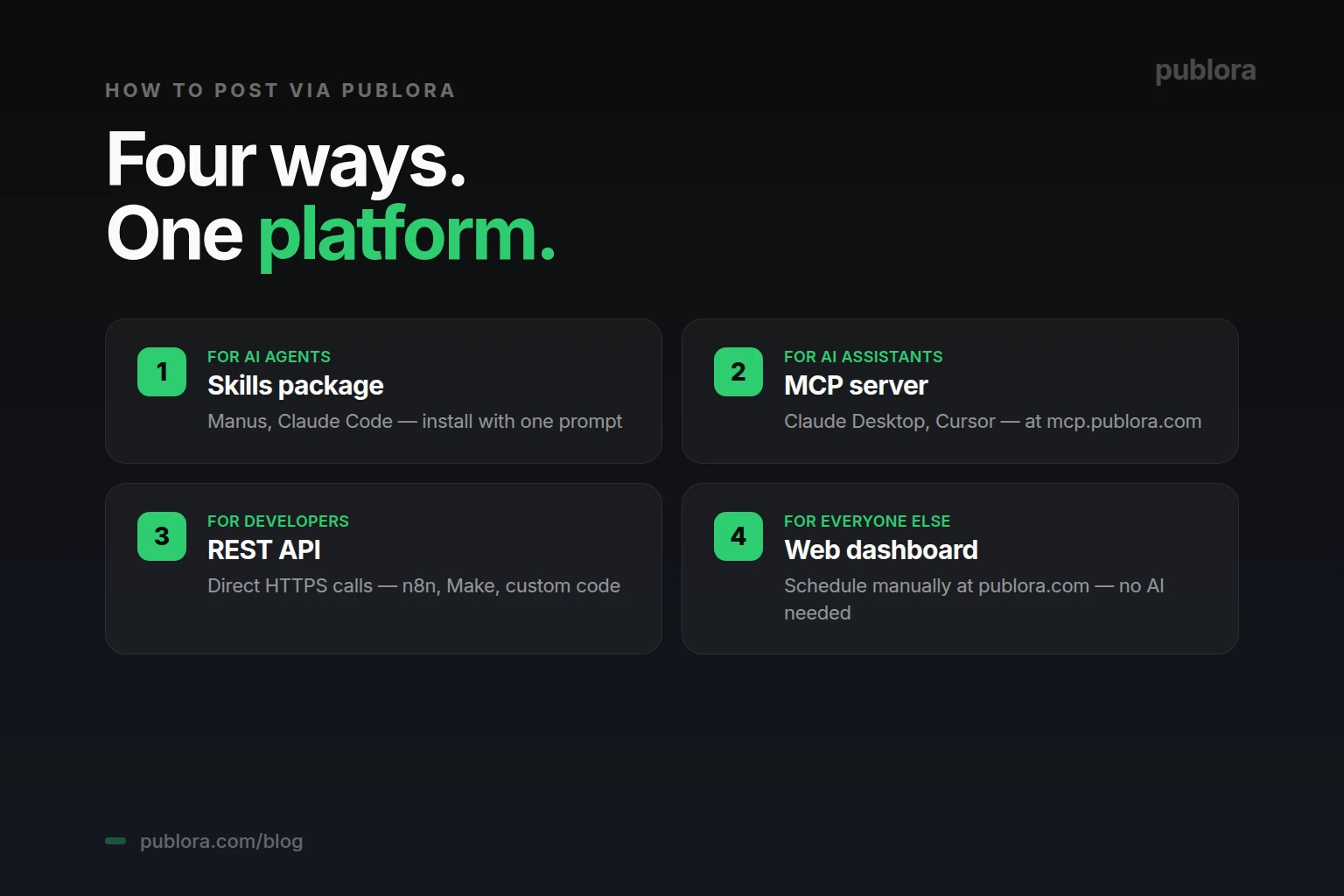
- 1. Skills package — for AI agents like Manus. The open-source publora/skills repo. One install prompt adds 9 skills (8 posting + 1 analytics) to any agent that supports skill packages. This is the fastest path for Manus users.
- 2. MCP server — for AI assistants like Claude Desktop and Cursor. The Publora MCP server at
mcp.publora.comexposes the same capabilities through the Model Context Protocol. Add a few lines to your client config and the AI assistant gains LinkedIn posting natively. - 3. REST API — for developers and no-code automations. Direct HTTPS calls to
api.publora.com. Use it from n8n, Make, Zapier, a cron job, or your own code. The full API is documented at docs.publora.com. - 4. Web dashboard — for everyone else. If you don't use AI agents at all, the dashboard at publora.com lets you schedule LinkedIn posts manually. Same accounts, same scheduling, just no AI in the loop.
The rest of this article focuses on path #1 — Manus + the skills package — because that's the headline use case. But if Manus isn't your tool, jump to the section that matches your stack.
The 4-Step Setup for Manus (About 30 Seconds)
The setup is the same as connecting Publora to any agent that supports the skills package. We covered the long version in how to connect Publora to Manus in 30 seconds. The short version:
- Get a Publora API key. Sign up free at publora.com/register and create a key at publora.com/settings/api. The key starts with
sk_. Copy it once — it is shown only at creation. - Connect your LinkedIn account. In the Publora dashboard, go to Connections, click Add, choose LinkedIn, and complete the OAuth flow. Both personal profiles and company pages are supported. LinkedIn Premium is not required.
- Tell Manus to install the skills. In a Manus session, paste this prompt: "Install skills from https://github.com/publora/skills". Manus pulls the package, parses the 9 available skills, and asks for the Publora API key.
- Verify it works. Ask Manus to list your connected platforms. If LinkedIn is in the list, you're done.
Free for LinkedIn use
LinkedIn is supported on Publora's free Starter plan. You get 15 posts per month for free across all platforms except X. For LinkedIn-only workflows, the free plan is enough to validate the setup before any commitment.
The linkedin-post Skill: What It Actually Does
The Publora skills package includes nine skills total — eight posting skills and one analytics skill. The one that handles LinkedIn is called linkedin-post. According to the official package documentation, this skill supports:
- Text posts — standard LinkedIn updates
- Posts with images — single image or multi-image posts
- Posts with videos — uploaded directly through the API
- Document posts — PDFs and slide decks (a strong-performing format on LinkedIn)
- Articles — long-form content
- Scheduling — post immediately or at a future time
For analytics — engagement, reactions, comments, follower growth — there is a separate skill in the same package called linkedin-analytics. We will cover that in a separate article. This one focuses on publishing.
Five Real Prompts to Run Today
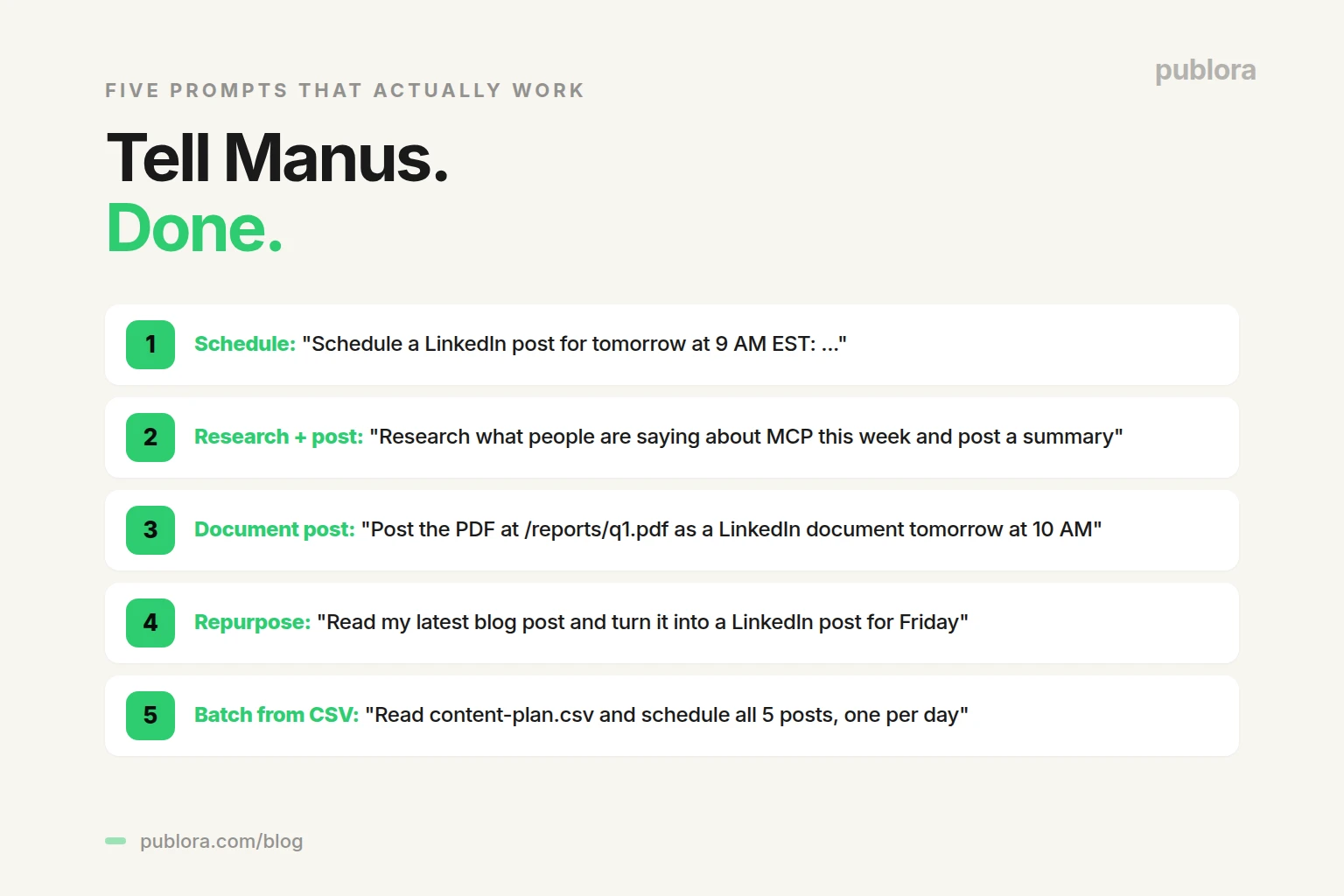
The skill is only as useful as the instructions you give it. Here are five prompts pulled from real workflows that creators and B2B founders are running with Manus + Publora. Each one corresponds to a common LinkedIn job.
1. Schedule a LinkedIn Post for a Specific Time
You: Schedule a LinkedIn post for tomorrow at 9 AM EST: "We just shipped our new API documentation. Built for developers who value clear, honest docs over marketing fluff."
Manus: Done — your post is scheduled for tomorrow at 9:00 AM EST. The linkedin-post skill handled the time conversion to UTC. Want me to also queue a follow-up later in the week?
Manus uses the scheduledTime parameter on the Publora API, converting your natural-language time to ISO 8601 automatically. On the Pro and Premium plans, you can schedule up to two months ahead.
2. Research a Topic, Then Post About It
You: Research what people are saying about MCP this week and post a summary to LinkedIn for tomorrow at 9 AM.
Manus: Searching the web for recent MCP discussions...
Calling skill: linkedin-post
Done. Your LinkedIn post is scheduled for tomorrow at 9:00 AM. Draft includes 3 specific examples (Anthropic, Cursor, Block) pulled from the last 7 days. Want to review before it publishes?
This is the workflow that closes the gap between "I should post about this" and "this is scheduled." Manus does the research, drafts the post in your voice, and queues it through Publora's linkedin-post skill — all from a single instruction.
3. Post a Document or Carousel
You: Take the PDF at /reports/q1-results.pdf and post it as a LinkedIn document tomorrow at 10 AM. Caption: a short summary of the three key wins.
Manus: Reading q1-results.pdf...
Drafting caption with 3 highlights...
Calling skill: linkedin-post (document type)
Document post scheduled for tomorrow 10:00 AM. PDF is attached and the caption pulls out the strongest numbers from the report.
LinkedIn document posts (PDFs, slide decks) are one of the strongest organic formats on the platform. The linkedin-post skill handles the upload through the official API.
4. Repurpose a Blog Article into a LinkedIn Post
You: Read my latest blog post at example.com/blog/post and turn it into a LinkedIn post — keep the takeaway sharp, drop the marketing language, schedule it for Friday morning.
Manus: Fetched the blog post. Drafted a LinkedIn version focused on the core takeaway (240 words). Removed the marketing intros. Scheduled for Friday 9:00 AM. The full link will go in the first comment, not the body.
This is repurposing — turn long-form into short-form without rewriting from scratch. Manus reads the source, drafts in your voice, and posts through the linkedin-post skill.
5. Build a Week of Content from a Spreadsheet
You: Read content-plan.csv and schedule all 5 posts to LinkedIn, one per day starting Monday at 9 AM EST.
Manus: Reading content-plan.csv (5 rows)...
Calling skill: linkedin-post (5 times)
All 5 posts scheduled. Mon 9:00, Tue 9:00, Wed 9:00, Thu 9:00, Fri 9:00 — all in EST. Your full week of LinkedIn content is queued.
Batch scheduling from a spreadsheet is one of the highest-leverage uses of Manus + Publora. Plan once, queue once, never open the dashboard again.
Best Practices for Prompting Manus to Post on LinkedIn
The linkedin-post skill does what you tell it to do, which means the quality of the output depends on how you describe what you want. A few patterns that consistently work:
- Be specific about timing. "Tomorrow at 9 AM EST" beats "tomorrow morning." Manus converts to UTC for the Publora API automatically — but only if you give it a clear time.
- Specify the audience or angle. "Aimed at B2B founders, not marketers" gives Manus a frame. Without one, the draft tends toward generic.
- Tell it what NOT to include. "No emojis. No marketing language. No '7 ways' framing." Constraints sharpen the draft.
- Reference your past content. "In the same voice as my last 3 LinkedIn posts" keeps the tone consistent.
- Ask for review before publish. By default, Manus drafts and asks for confirmation. If you want auto-publish, say so explicitly.
If You Don't Use Manus
Manus is the headline path because it shows the autonomy story most clearly — research, draft, schedule, all from a sentence. But the same LinkedIn integration runs through three other interfaces:
- Claude Desktop, Cursor, or any MCP client. Add Publora's MCP server to the client config (host:
mcp.publora.com) and the AI assistant can call the same linkedin-post tool conversationally. The setup steps are similar to Manus and take about a minute. - n8n, Make, Zapier, or a custom script. The REST API at
api.publora.com/api/v1/create-postaccepts the same payload. POST the content, the platform IDs, and the scheduledTime — done. Useful for triggered workflows like "every time a new blog post publishes, post a LinkedIn announcement." - The Publora web dashboard. If you just want a clean scheduler with no AI in the loop, sign up at publora.com, connect LinkedIn, and use the calendar UI. Same scheduling backend, no agents required.
The reason Publora supports all four is that "the right interface" depends on how you work. Solo creators often want the dashboard. Marketing teams use the API to wire up content workflows. Agencies use Manus or Claude to delegate the drafting. The LinkedIn account doesn't care which entrance you use.
When to Use Manus + Publora vs. the LinkedIn Native Scheduler
LinkedIn now has a built-in native scheduler — you can schedule posts directly from the LinkedIn composer. So why use Manus + Publora?
The native scheduler works fine for one-off posts when you are already in the LinkedIn composer. It does not help when you want the AI to draft, when you want to queue from a spreadsheet, when you want to repurpose a blog post, or when you want to schedule across multiple platforms at once. Those are jobs for an agent connected to Publora's API. The native scheduler is the floor; Manus + Publora is the workflow.
Frequently Asked Questions
Can Manus AI post to LinkedIn?
Yes. Once you install the Publora skills package, Manus gains a linkedin-post skill that lets it create, schedule, and publish LinkedIn posts through the official API. Setup is one prompt, and the skill works on the free Starter plan with 15 posts per month.
Is it safe to let Manus AI post to my LinkedIn?
Yes. The Publora skills package uses the official LinkedIn API with OAuth-based authentication — no scraping, no fake browser, no terms-of-service grey area. You stay in control: Manus drafts, you review before publishing, or set rules for auto-publishing. Your API key can be revoked at any time.
Do I have to use Manus, or can I post to LinkedIn through Publora some other way?
You can use any of four paths. Manus or another AI agent through the open-source skills package is one. The MCP server at mcp.publora.com works with Claude Desktop, Cursor, and any MCP-compatible client. The REST API at api.publora.com handles direct HTTPS calls. And the web dashboard at publora.com lets you schedule manually with no AI in the loop.
How do I install the LinkedIn skill in Manus?
Tell Manus: "Install skills from https://github.com/publora/skills". The agent pulls the package from GitHub, asks for your Publora API key from publora.com/settings/api, and the integration is live. The linkedin-post skill is part of the package.
Can Manus schedule LinkedIn posts for later?
Yes. Include the time in your prompt — for example, "schedule a LinkedIn post for tomorrow at 9 AM EST about Q1 results." Manus converts to UTC and passes the scheduledTime parameter to Publora. The Pro plan supports scheduling up to two months in advance.
What kind of LinkedIn posts can Manus create?
The linkedin-post skill supports text posts, posts with images, posts with videos, and document posts (PDFs, slides). Both personal-profile and company-page posting are supported. For analytics, the same package includes a separate linkedin-analytics skill.
Does posting to LinkedIn through Manus cost extra?
The Publora skills package is free and open source. Publora's Starter plan is free forever with 15 posts/month. The Pro plan is $2.99 per account per month for 100 posts; Premium is $9.99 per account per month for 500 posts. Manus has its own pricing through manus.im.
Do I need a LinkedIn premium account to use this?
No. The linkedin-post skill works with any LinkedIn account that you connect via OAuth in the Publora dashboard. Both personal profiles and company pages are supported. LinkedIn Premium is not required.
Let your AI agent post to LinkedIn for you
Free Starter plan. The linkedin-post skill works out of the box with Manus, Claude Code, MCP clients, or your own code.
Get Started FreeFurther Reading
- How to Connect Publora to Manus AI Agent in 30 Seconds — full setup guide
- Publora Skills on GitHub — open source skills package
- Publora API Documentation — REST API and MCP reference
- Publora Pricing
- Manus AI — autonomous agent home page
Related Articles
Instagram Algorithm 2026: How Reach Really Works Now
How the Instagram algorithm works in 2026 - the separate systems for Feed, Reels, Stories, and Explore, why sends beat likes, and what Instagram says not to do.
LinkedIn Algorithm 2026: How It Ranks Posts (and Why AI Search Cites Them)
How the LinkedIn algorithm works in 2026 - the AI ranking model, the signals that matter, what gets suppressed, and why your posts now show up in AI search.
LinkedIn Collaborative Posts: A Shared Byline Is Now a Feature
LinkedIn Collaborative Posts let two or more people and Pages co-publish one post to both audiences. Here's what they are, who they're for, and how to use them.
Publer vs Publora: Which Is Actually Cheaper Per Account? (2026)
Publer vs Publora on real 2026 pricing - per-account cost, post limits, platforms, and API/MCP. An honest look at which scheduler is actually cheaper.