How to Automate Instagram with Manus AI Agent (2026)
TL;DR
Automate Instagram with Manus AI — photos, carousels, Reels, Stories. Real prompts, JPEG rule, Business account requirement, four ways to connect via Publora.
How to Automate Instagram Posting with Manus AI Agent in 2026
TL;DR
Manus is an autonomous AI agent. Once you install the Publora skills package, it gains an instagram-post skill that publishes photos, carousels (2–10 images), Reels, and Stories through the official Instagram Graph API. You tell Manus in plain English what to post and when, and it handles the upload, formatting, and scheduling. Two non-negotiables to know before you start: Instagram requires a Business account and the API only accepts JPEG images.
Why Use Manus to Automate Instagram
Instagram is the second most-used social platform for brand marketing, but its API has a reputation for being restrictive. Meta only allows posting from Business accounts, only accepts JPEG for images, and has strict size, duration, and rate-limit rules that differ between Reels, Stories, and carousels. Most teams give up on automation and just keep posting manually from the app.
Manus is an autonomous AI agent that can search the web, read files, draft captions, and run multi-step workflows on its own. With the Publora skills package installed, it can also publish to Instagram — and it handles the format and rate-limit gotchas for you. You give it the brief and the media; it figures out the rest.
This article walks through exactly how. The four content types Manus can publish, the prompts that work, the Instagram-specific gotchas to know, and the four ways Publora connects to Instagram — for users with or without an AI agent.
The Four Instagram Content Types Manus Can Publish
Instagram's Graph API supports four distinct content types, each with its own media rules. The instagram-post skill handles all four through one set of natural-language prompts.
1. Single Image Post
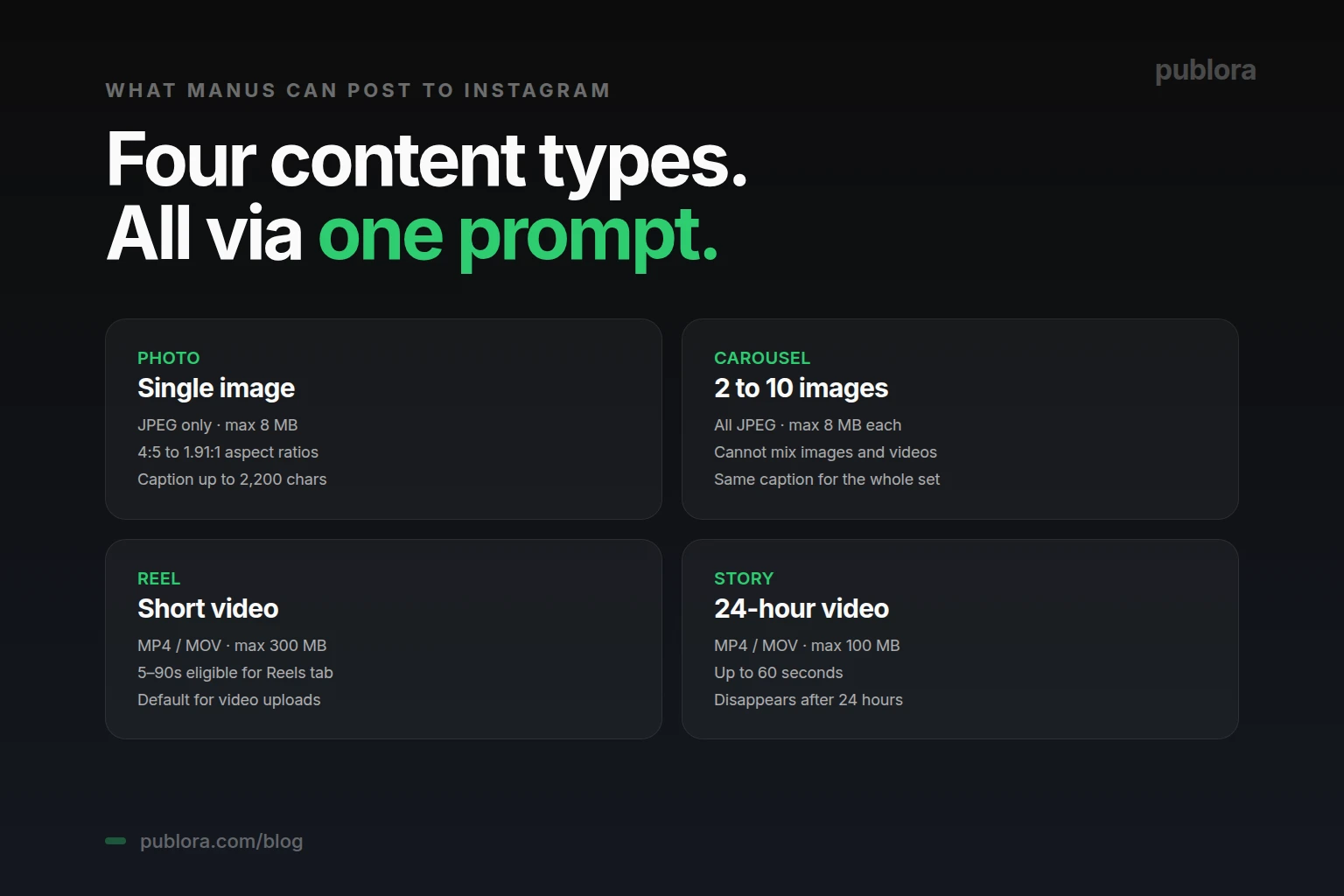
The simplest type — one image with a caption. Strict requirements: JPEG only, max 8 MB, aspect ratio between 4:5 (portrait) and 1.91:1 (landscape). Captions can be up to 2,200 characters, with the first 125 visible before the "more" cutoff and a maximum of 30 hashtags.
2. Carousel (2 to 10 images)
Multiple images in one swipeable post. Native Instagram allows up to 20, but the API caps it at 10. All images must be JPEG; you cannot mix images and videos in a carousel — pick one or the other. Each image is subject to the 8 MB size limit and the same aspect ratio range.
3. Reels (Short Video)
Instagram's primary video format and the format that gets significantly more reach than static posts. The API supports videos up to 15 minutes, but only 5 to 90 seconds are eligible for the Reels tab and Explore page distribution. Anything longer is published as a regular video post. MP4 or MOV format, max 300 MB. Reels are the default video type for the instagram-post skill.
4. Stories (Ephemeral)
Stories disappear after 24 hours and appear at the top of followers' feeds. Up to 60 seconds, max 100 MB, MP4 or MOV. Note that the platformSettings.instagram.videoType parameter that controls Reels-vs-Stories is currently configurable only through the REST API — when posting via MCP, the skill defaults to Reels.
The 4-Step Setup for Manus
The setup mirrors the general Publora-to-Manus connection, with one Instagram-specific addition: you need a Business account.
- Convert Instagram to a Business account. In the Instagram app: Settings → Account → Switch to Professional Account → Business. The account also needs to be linked to a Facebook Page. Personal and Creator accounts cannot post via API.
- Sign up at Publora. Free at publora.com/register. Get your API key from publora.com/settings/api — it starts with
sk_. - Connect Instagram in the Publora dashboard. Connections → Add Connection → Instagram → authorize via Facebook (you'll select the Facebook Page linked to your Business account and grant content publishing permissions).
- Install the skills in Manus. One prompt: "Install skills from https://github.com/publora/skills". Manus pulls the package, asks for your Publora API key, and the integration is live. The instagram-post skill is included.
Business account is the most common stumbling block
If your test post fails with a permissions error, double-check that the Instagram account has been switched to Business and linked to a Facebook Page. Both are required by Meta — neither alone is enough.
Five Real Prompts for Instagram via Manus
The instagram-post skill follows whatever you describe. Here are five prompts pulled from real workflows — each illustrates a different content type and pattern.
1. Schedule a Single Image Post
You: Schedule an Instagram post for tomorrow at 9 AM with the caption "Excited to announce our Series A! 🎉" and attach the image at /campaign/funding-announcement.jpg.
Manus: Reading funding-announcement.jpg (verified JPEG, 2.3 MB)...
Calling skill: instagram-post
Done — your Instagram post is scheduled for tomorrow at 9:00 AM. The image meets all API requirements (JPEG, under 8 MB, 4:5 aspect ratio).
2. Build an Instagram Carousel from a Folder
You: Create an Instagram carousel from the 5 images in /marketing/q2-launch/. Caption: "5 design principles every startup should follow. Swipe through for the full breakdown. #design #startup #ux".
Manus: Reading 5 files from /marketing/q2-launch/...
All 5 files are JPEG, under 8 MB each, aspect ratios within range. Carousel ready.
Calling skill: instagram-post (carousel)
Carousel scheduled. 5 slides, single shared caption with 3 hashtags. Want me to draft a follow-up Story to drive traffic to the carousel after it goes live?
Note: a carousel must be either all images or all videos — the API doesn't allow mixing. If your folder has a mix, Manus will flag it and ask you to choose.
3. Post a Reel
You: Post the video at /tutorials/cicd-60-seconds.mp4 as an Instagram Reel tomorrow at noon. Caption: "Set up CI/CD in 60 seconds. #devops #tutorial #coding".
Manus: Reading cicd-60-seconds.mp4 (62 seconds, 84 MB, MP4)...
Eligible for Reels tab (5–90s window, under 300 MB cap).
Calling skill: instagram-post (Reel)
Reel scheduled for tomorrow 12:00. Default videoType is REELS.
4. Post a Story (Time-Sensitive)
You: Post the 30-second clip at /announcements/tomorrow.mp4 as an Instagram Story right now. Caption: "Big announcement dropping tomorrow!".
Manus: Switching videoType to STORIES (using REST API path — Stories aren't configurable via MCP).
Calling skill: instagram-post (Story)
Story posted. It will disappear in 24 hours.
Note: Stories disappear after 24 hours, so they're best published close to when you actually want them visible. If you schedule a Story for next week, by the time it publishes you may have lost the news cycle that made it timely.
5. Repurpose a Tweet into an Instagram Post
You: Take my last LinkedIn post about MCP, rewrite the caption for Instagram (shorter, more visual, drop the formal tone), use the carousel images at /assets/mcp-explainer/, and schedule for Saturday at 10 AM.
Manus: Pulling the LinkedIn post...
Drafting Instagram caption (180 words, 5 hashtags, hook in first 125 chars)...
Reading 4 carousel images (all JPEG, all within size limits)...
Calling skill: instagram-post (carousel)
Scheduled for Saturday 10:00 AM. Caption draft attached for your review before it publishes.
Common Pitfalls to Avoid
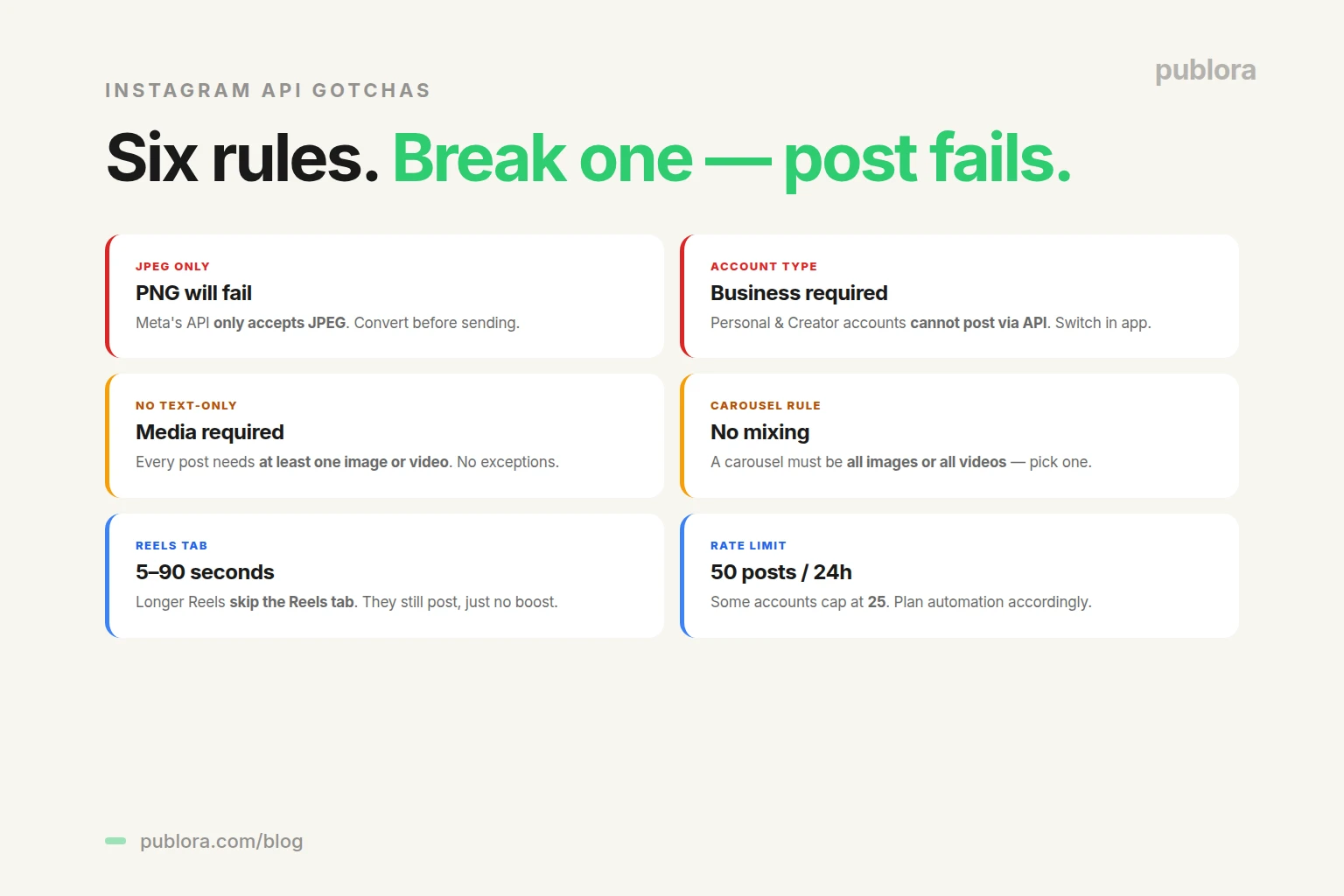
Most failed Instagram posts via Manus + Publora come down to a small list of API rules. Here are the ones to remember.
- PNG images will fail. The Instagram API only accepts JPEG. If your asset is PNG, convert before sending it to Manus. Manus can also do the conversion if you ask it to.
- Personal and Creator accounts cannot post via API. Only Business accounts work. This is a Meta restriction, not a Publora one.
- Every Instagram post requires media. No text-only posts. The API will reject any post without at least one image or video.
- Carousels can't mix images and videos. Pick one or the other. If you need both, post them separately.
- Reels longer than 90 seconds skip the Reels tab. They still post, but they won't be eligible for the discovery surface that gives Reels their reach advantage. For organic reach, keep videos under 90 seconds.
- Rate limit: 50 posts per 24 hours. Some accounts report a 25-post cap. Plan automation accordingly.
- Don't ignore the first 125 characters. That's what users see in the feed before "more". The hook lives there.
If You Don't Use Manus
Manus is the headline path because the autonomy story is most visible there — read a brief, draft a caption, schedule a Reel, all from one sentence. But the same Instagram integration is reachable through three other interfaces:
- Claude Desktop, Cursor, or any MCP client. Add Publora's MCP server (host:
mcp.publora.com) to the client config and the AI assistant gains the same instagram-post tool. Setup is similar to Manus and takes about a minute. - n8n, Make, Zapier, or a custom script. The REST API at
api.publora.com/api/v1/create-postaccepts the same payload. POST the platform ID (e.g.,instagram-11223344), the content, and the scheduledTime. The REST API is also the path you need if you want to controlvideoTypefor Stories — that parameter is not exposed via MCP. - The Publora web dashboard. If you don't run AI agents at all, the dashboard at publora.com lets you upload media, write captions, and schedule with a calendar UI. Same backend, no AI in the loop.
Same Instagram account. Same Publora API key. Pick the entrance that matches how you work.
When to Use Manus + Publora vs. the Native Instagram Scheduler
Instagram now has a built-in native scheduler in Meta Business Suite. So why automate through Manus?
The native scheduler is fine for one-off posts when you're already in Business Suite. It does not help when you want the AI to draft captions, when you want to repurpose content from another platform, when you want to batch-schedule from a folder of media files, or when you want one tool to handle Instagram alongside LinkedIn, Threads, and X. Those are jobs that require an agent connected to Publora's API. The native scheduler is the floor; Manus + Publora is the workflow.
Frequently Asked Questions
Can Manus AI post to Instagram?
Yes — once you install the Publora skills package, Manus gains an instagram-post skill that supports photos, carousels of 2 to 10 images, Reels, and Stories through the official Instagram Graph API. Instagram requires a Business account.
Why does Manus need an Instagram Business account?
This is a Meta requirement. The Instagram Graph API only allows posting from accounts that have been converted to a Business account and linked to a Facebook Page. Personal and Creator accounts cannot post via API.
What types of Instagram content can Manus post?
Four types: single image posts (JPEG only, up to 8 MB), carousels of 2 to 10 images (all JPEG), Reels (MP4/MOV, up to 300 MB and 15 minutes — only 5 to 90 seconds eligible for the Reels tab), and Stories (MP4/MOV, up to 100 MB, 60 seconds max, disappear after 24 hours).
Why does the Instagram skill require JPEG?
Instagram's Content Publishing API only accepts JPEG. PNG, WebP, and GIF are rejected. This is a Meta API restriction. Convert to JPEG before sending it to Manus — Manus can also do the conversion if you ask.
Can Manus schedule Instagram Reels and Stories?
Yes for Reels. Stories are technically schedulable but should be queued close to publish time since they expire 24 hours after going live. Default video type is REELS; set videoType to STORIES via the REST API for Stories.
How many Instagram posts can I send through Manus per day?
Instagram's API allows up to 50 posts per 24-hour rolling window — some accounts report a 25-post cap. Publora's plan limits are separate: free Starter covers 15 posts/month, Pro covers 100/account/month, Premium 500.
Is automating Instagram with Manus safe? Can my account get banned?
Yes — Publora uses Meta's official Graph API with proper OAuth 2.0 authentication. No scraping, no browser automation. As long as you respect rate limits and follow Instagram's community guidelines, your account is not at risk.
Do I have to use Manus, or are there other ways to post to Instagram via Publora?
Four paths: Manus or another agent through the open-source skills package, the MCP server at mcp.publora.com for Claude Desktop and Cursor, the REST API at api.publora.com for direct HTTPS calls, and the web dashboard at publora.com for manual scheduling without AI.
Let Manus run your Instagram
Free Starter plan. The instagram-post skill ships with photos, carousels, Reels, and Stories.
Get Started FreeFurther Reading
- How to Connect Publora to Manus AI Agent in 30 Seconds — full setup guide
- How to Post to LinkedIn with Manus AI Agent — same workflow, different platform
- Publora Skills on GitHub — open source skills package
- Publora API Documentation — REST and MCP reference
- Publora Pricing
Related Articles
Instagram Algorithm 2026: How Reach Really Works Now
How the Instagram algorithm works in 2026 - the separate systems for Feed, Reels, Stories, and Explore, why sends beat likes, and what Instagram says not to do.
LinkedIn Algorithm 2026: How It Ranks Posts (and Why AI Search Cites Them)
How the LinkedIn algorithm works in 2026 - the AI ranking model, the signals that matter, what gets suppressed, and why your posts now show up in AI search.
LinkedIn Collaborative Posts: A Shared Byline Is Now a Feature
LinkedIn Collaborative Posts let two or more people and Pages co-publish one post to both audiences. Here's what they are, who they're for, and how to use them.
Publer vs Publora: Which Is Actually Cheaper Per Account? (2026)
Publer vs Publora on real 2026 pricing - per-account cost, post limits, platforms, and API/MCP. An honest look at which scheduler is actually cheaper.