Best Manus Skills for Content Creators in 2026
TL;DR
The 9 Publora skills that turn Manus into a social media content engine. What each skill does, which to install first, and how to use them as a creator.
Best Manus Skills for Content Creators in 2026
TL;DR
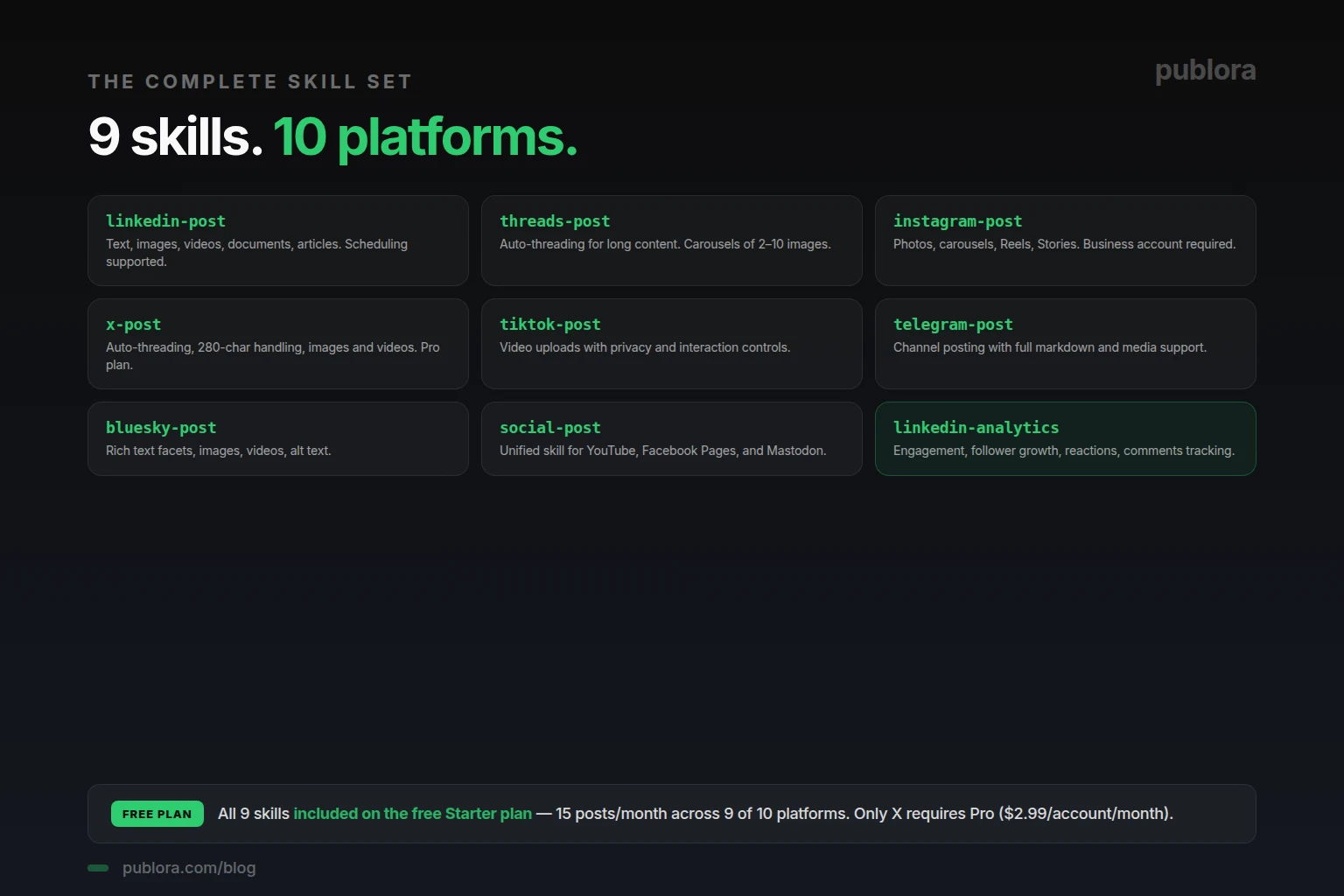
The Publora skills package turns Manus into a social media content engine — nine skills covering ten platforms, all installable with a single natural-language prompt. Eight of the skills handle posting (LinkedIn, Threads, Instagram, X, TikTok, Telegram, Bluesky, plus YouTube/Facebook/Mastodon as one unified skill). One handles LinkedIn analytics. The whole package is open-source under MIT license, and Publora's free Starter plan covers nine of the ten platforms.
Why Manus Without Skills Is Half a Tool
Out of the box, Manus is an autonomous AI agent that can search the web, read files, write drafts, and execute code. What it can't do without help is reach the world outside its sandbox. It can write a perfect LinkedIn post, but it can't actually publish one. It can draft a thread, but it can't queue it for tomorrow morning. The wall is the same one every general-purpose agent hits: tools.
The Publora skills package is the wall-breaker for social media. Nine skills, one install prompt, ten platforms. Once installed, Manus stops drafting in a vacuum and starts publishing — through the official APIs of LinkedIn, Instagram, X, and the rest, with the format rules and rate limits handled automatically.
This article walks through what each skill actually does — pulled directly from the open-source package documentation — and which ones to use first depending on the kind of content you make.
The Nine Skills, At a Glance
1. linkedin-post — The Workhorse
The skill most B2B creators install first. Per the official documentation, linkedin-post creates and schedules LinkedIn posts with text, single images, multi-image grid layouts, videos, and PDF documents. It supports both personal profiles and company pages, and handles the scheduledTime parameter for queuing posts up to two months ahead on the Pro plan.
Best for: founders, B2B marketers, technical writers, anyone whose primary audience lives on LinkedIn. Free plan: yes — 15 posts per month covered.
2. threads-post — The Conversational One
Per the package docs, threads-post creates and schedules posts on Meta's Threads with auto-threading for long content, image carousels of 2 to 10 images, and reply control settings. The auto-threading is especially useful — you write one long post, the skill splits it into a properly-formatted thread.
Best for: creators who want a more conversational tone than LinkedIn allows. Threads's audience overlaps with Instagram but rewards longer, more thoughtful posts. Free plan: yes.
3. instagram-post — The Four-Format Skill
The most feature-rich skill in the package. instagram-post supports all four Instagram content types: image posts (JPEG only, up to 8 MB), carousels of 2-10 images, Reels (MP4/MOV, up to 300 MB and 15 minutes — though only 5-90 seconds is eligible for the Reels tab), and Stories (60-second max, disappear after 24 hours). Requires an Instagram Business account; Personal and Creator accounts cannot post via API.
Best for: visual creators, brands, anyone running campaigns with photos or video. Free plan: yes. Detailed walkthrough in how to automate Instagram with Manus.
4. x-post — The Short-Form Skill
From the docs, x-post supports text posts, images (up to 4), videos, and automatic thread splitting for long-form content. The auto-thread feature is the standout — you can hand the skill a 1,500-word draft and it will split it into properly-numbered tweets.
Best for: creators with X (Twitter) presence, anyone in tech or media. Free plan: no — X requires the Pro plan ($2.99 per account per month) due to Twitter API costs.
5. tiktok-post — The Video-First Skill
According to the package, tiktok-post uploads and schedules videos to TikTok with privacy controls, interaction settings (comments, duet, stitch), and commercial content disclosure. The privacy and disclosure settings are required for branded content — the skill handles them through the official TikTok API, which means no terms-of-service grey area.
Best for: short-form video creators, brands running TikTok ads, anyone with a TikTok-first audience. Free plan: yes.
6. telegram-post — The Channel Skill
Per the docs, telegram-post handles Telegram channels and groups with full markdown formatting, photos, videos, and message delivery options. Telegram is underused by creators outside Eastern Europe and South Asia, but for niches where it matters (crypto, dev communities, news), the markdown support makes it the cleanest channel for long-form content.
Best for: creators with international audiences, crypto/dev communities, anyone running a newsletter-style Telegram channel. Free plan: yes.
7. bluesky-post — The Open Network Skill
The docs state bluesky-post creates Bluesky posts with auto-detected hashtags and URLs, images with alt text, and videos. Bluesky's audience is small but high-signal — heavily concentrated among developers, writers, and academics. The alt text support is notable; Bluesky users actually expect it.
Best for: developers, writers, anyone with an audience that left X for Bluesky. Free plan: yes.
8. social-post — The Catch-All
From the docs, social-post is a unified skill that posts to YouTube, Facebook Pages, and Mastodon. Three platforms in one skill, because they all work through standard posting without platform-specific complexity. For YouTube it handles video uploads; for Facebook Pages, standard posts with media; for Mastodon, fediverse posting.
Best for: creators who post occasionally to one of these platforms but don't want a dedicated skill for each. Free plan: yes.
9. linkedin-analytics — The Only Analytics Skill (For Now)
The one analytics skill in the package. Per the docs, linkedin-analytics returns detailed analytics for LinkedIn posts and profiles — impressions, engagement, follower growth — and lets you interact with posts through reactions and comments via API.
Best for: creators serious about LinkedIn growth who want data-driven content decisions. Useful with the autonomous research-and-post workflow — Manus pulls last week's analytics, identifies the top-performing post, and uses that as the topic seed for next week's content. Free plan: yes.
Which Skills to Use First
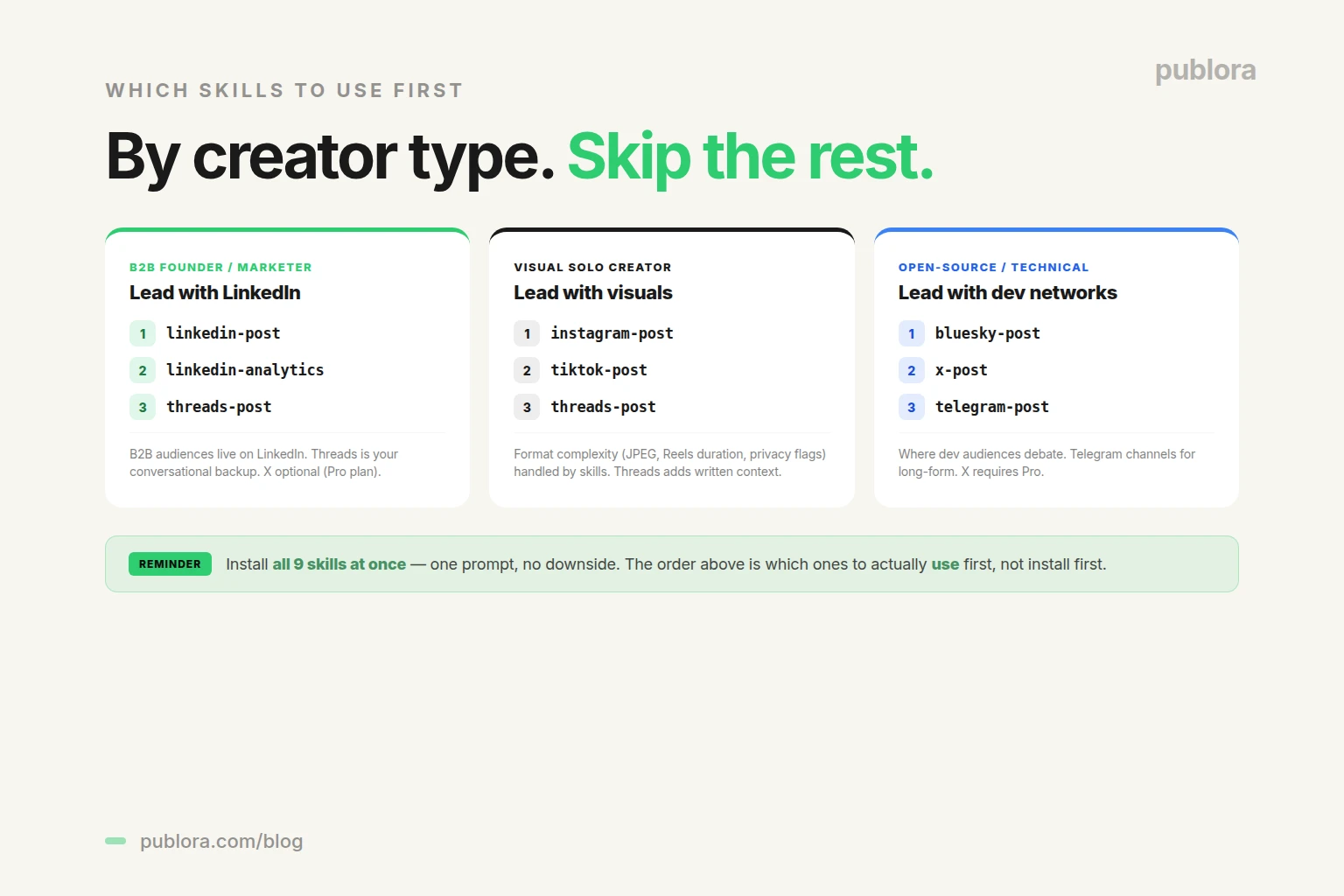
You install all nine at once — the package is a single install. The question isn't which to install; it's which to actually use first. Three patterns based on creator type:
If You're a B2B Founder or Marketer
Lead with linkedin-post + linkedin-analytics. LinkedIn is where B2B audiences live in 2026. Combined, the two skills let Manus draft, schedule, and learn from your LinkedIn content. Add threads-post as a secondary channel for the conversational version of your LinkedIn posts. x-post is optional and requires the Pro plan.
If You're a Solo Creator With a Visual Brand
Lead with instagram-post + tiktok-post. Both skills handle the format complexity (JPEG enforcement on Instagram, privacy flags on TikTok) so Manus can post without you debugging API errors. Add threads-post for written context around the visual content.
If You're Building Something Open-Source or Technical
Lead with bluesky-post + x-post + telegram-post. Bluesky and X are where dev audiences debate; Telegram channels are where they consume long-form content. The combination covers the technical creator's main reach surfaces.
How to Install — One Prompt
Setup is the same regardless of which skills you'll actually use. Tell Manus:
"Install skills from https://github.com/publora/skills"
Manus pulls the package from GitHub, parses the nine skill manifests, and asks for your Publora API key (get it at publora.com/settings/api — starts with sk_). The integration is live across all nine skills immediately. The full setup walkthrough is in how to connect Publora to Manus in 30 seconds.
What Each Skill Does Differently
Each skill is more than a thin wrapper. The platform-specific complexity that usually breaks API integrations is handled inside the skill:
- linkedin-post handles LinkedIn's distinct treatment of personal profile vs company page posts, document uploads, and the scheduling parameter format.
- instagram-post enforces JPEG-only for images, validates aspect ratios (4:5 to 1.91:1), checks file size (8 MB limit per image, 300 MB for Reels video), and sets the videoType parameter for Reels vs Stories.
- x-post auto-splits content over 280 characters, manages emoji counting (Unicode emoji count more than ASCII chars on X), and chains tweets in the right order.
- threads-post auto-threads long content and supports the new image carousel format Meta launched in 2025.
- tiktok-post handles the privacy enum, the duet/stitch flags, and the commercial content disclosure required for branded posts.
- telegram-post applies Telegram's specific markdown subset (different from standard markdown —
*bold*not**bold**). - bluesky-post auto-detects URLs and hashtags as rich text facets so they render correctly.
- social-post dispatches to YouTube, Facebook Pages, or Mastodon based on which platform ID you pass.
- linkedin-analytics wraps the LinkedIn analytics endpoints and returns structured metrics rather than raw API responses.
The result: when you tell Manus "post this to Instagram," you don't have to mention the JPEG rule or the aspect ratio. The skill knows. If your input doesn't meet the constraint, the skill returns an error before the post fails — saving you the silent publishing failure that's common with raw API integrations.
What's Not in the Skills Package (Yet)
A few things creators sometimes ask about that aren't currently in the package:
- TikTok analytics. The package has
linkedin-analyticsbut no equivalent for other platforms. Per-platform analytics is on the roadmap. - Comment monitoring. The skills publish but don't monitor — you can't ask Manus "alert me when someone comments on my post" through the current package.
- Direct messages. No DM-sending skills. The package focuses on public publishing.
If your workflow needs any of these, you can use the Publora REST API directly for the unsupported features. The skills cover the most common 90% of creator use cases; the remaining 10% is reachable through code.
Frequently Asked Questions
What are the best Manus skills for content creators?
The Publora skills package adds nine social media skills — eight posting (linkedin-post, threads-post, instagram-post, x-post, tiktok-post, telegram-post, bluesky-post, social-post for YouTube/Facebook/Mastodon) and one analytics (linkedin-analytics). Top three to use first: linkedin-post, threads-post, and instagram-post.
How do I install Manus skills?
Tell Manus: "Install skills from https://github.com/publora/skills". The agent pulls the open-source package from GitHub, parses the nine skills, and asks for your Publora API key. Setup takes about 30 seconds.
Are Publora skills free for content creators?
The skills package is free and open-source (MIT). Publora's Starter plan is also free and covers nine of the ten platforms. Only X requires Pro at $2.99/account/month. For most solo creators, the free plan is enough to validate the workflow.
Which Publora skill should I install first?
Install all nine — it's one prompt and there's no downside. If you have to pick one to start using, pick the skill for the platform where you already have an audience. linkedin-post and threads-post for B2B; instagram-post and tiktok-post for visual creators.
Can Manus skills handle Instagram Reels and Stories?
Yes. The instagram-post skill supports all four content types: photos, carousels (2-10 images), Reels (up to 300 MB, 15 min — only 5-90s eligible for the Reels tab), and Stories (up to 100 MB, 60s, disappear after 24h). Business account required.
Does Manus have an analytics skill?
Yes for LinkedIn. The linkedin-analytics skill returns engagement metrics, follower growth, reactions, and comments. Analytics for other platforms is on the roadmap; for now, linkedin-analytics is the only dedicated analytics skill.
How is the skills package different from a regular API integration?
The skills package wraps the Publora REST API in a format Manus and other agents can install with one prompt. You don't write code, manage authentication headers, or look up endpoint schemas. The agent calls the skill; the skill calls Publora; Publora calls the platform.
Can I use Publora skills with agents other than Manus?
Yes. The skills package is agent-agnostic. It works with Manus, Claude Code, Cursor, Cline, Goose, OpenClaw, and any other agent that supports skill packages or MCP. Same nine skills, same API key, same ten platforms.
Install the skills. Stop opening dashboards.
Free Starter plan covers 9 of 10 platforms. The skills package is open-source on GitHub.
Get Started FreeFurther Reading
- How to Connect Publora to Manus AI Agent in 30 Seconds
- How to Post to LinkedIn with Manus AI Agent
- How to Automate Instagram with Manus AI Agent
- Cross-Post to Social Media with Manus AI Agent
- Use Manus to Research a Topic and Post About It
- Best AI Agent for Social Media Automation in 2026
- Publora Skills on GitHub — open-source package
Related Articles
Instagram Algorithm 2026: How Reach Really Works Now
How the Instagram algorithm works in 2026 - the separate systems for Feed, Reels, Stories, and Explore, why sends beat likes, and what Instagram says not to do.
LinkedIn Algorithm 2026: How It Ranks Posts (and Why AI Search Cites Them)
How the LinkedIn algorithm works in 2026 - the AI ranking model, the signals that matter, what gets suppressed, and why your posts now show up in AI search.
LinkedIn Collaborative Posts: A Shared Byline Is Now a Feature
LinkedIn Collaborative Posts let two or more people and Pages co-publish one post to both audiences. Here's what they are, who they're for, and how to use them.
Publer vs Publora: Which Is Actually Cheaper Per Account? (2026)
Publer vs Publora on real 2026 pricing - per-account cost, post limits, platforms, and API/MCP. An honest look at which scheduler is actually cheaper.